Automate Incident Response
- Agent acknowledges incidents and starts investigating within seconds
- Correlates logs, metrics, deployments, and past incidents automatically
- Proposes fixes or resolves autonomously based on your run mode
- Shares investigation threads with teammates via deep links
- Knowledge captured in memory for future incidents
The problem: 3 AM, 5 tabs, one exhausted engineer
When an alert fires at 3 AM, you're not just woken up—you're context-switching. You open PagerDuty to see what's wrong, then Grafana for metrics, then Log Analytics for errors, then team chat to see if anyone else knows anything, then a runbook that was last updated six months ago.
Meanwhile, the clock is ticking on your MTTR. The knowledge of how to fix this issue exists—it's in a past incident, in a teammate's head, or in a runbook nobody reads. But at 3 AM, you're not finding it.
How Azure SRE Agent solves this
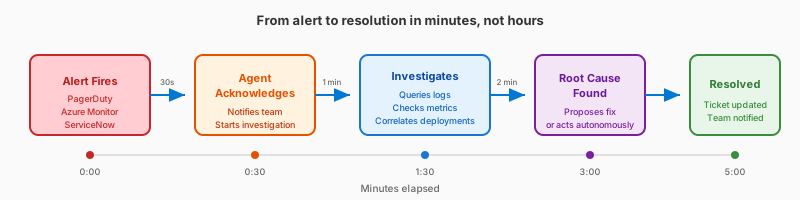
When an incident fires, your agent starts working within seconds:
- Acknowledges the alert in your incident platform (PagerDuty, ServiceNow, or Azure Monitor)
- Queries your observability tools — Azure Monitor, Application Insights, plus any connected sources like Kusto or third-party tools via MCP
- Correlates with deployment history — if you've connected source control or built a deployment-aware custom agent
- Checks memory for similar issues — "We saw this exact error 3 weeks ago. Here's what fixed it."
- Forms hypotheses about what went wrong and validates each one with evidence
- Proposes a fix or resolves autonomously based on your run mode
By the time you wake up, the incident is either resolved with a full reasoning trail, or you have a clear recommendation waiting for your approval.
What makes this different
Unlike runbooks, your agent learns from every incident. When a fix works, it remembers. When you add a runbook to knowledge base, your agent references it automatically. Runbooks go stale; your agent's memory grows smarter.
Unlike scripts, your agent adapts. A script runs the same steps regardless of context. Your agent reasons about the specific situation—correlating evidence across all connected sources—to understand what's actually wrong.
Unlike dashboards, your agent acts. Dashboards surface data for you to interpret. Your agent interprets the data, forms hypotheses, and proposes solutions—so you're reviewing conclusions, not raw metrics.
Before and after
| Before | After | |
|---|---|---|
| Acknowledgment | Wait for human to wake up | Agent acknowledges immediately |
| Tools opened | 5+ tabs | 0 (agent handles it) |
| Investigation | Manual correlation across tools | Agent queries all sources automatically |
| Knowledge captured | In engineer's head | Saved to memory |
| Sharing findings | Screenshot or describe the navigation path | Copy thread link, paste in Teams |
| Sleep interrupted | Yes | No |
Share investigation threads
During an active incident, you need your team aligned on what the agent found. Every investigation thread has a Copy link to thread option that generates a shareable deep link — paste it into Teams or an email, and your teammate opens directly to that investigation.
To copy a thread link:
- Open any incident investigation thread — in either the side drawer or full-page view
- Click the ⋯ (more options) button next to the thread title
- Select Copy link to thread
The copied URL works across access methods — whether your team uses the Azure portal or sre.azure.com. Recipients with access to your agent click the link and land directly on the investigation thread with the full reasoning trail and evidence the agent collected.
When to share thread links:
- During an incident bridge, share the agent's root cause analysis with the team
- In post-incident reviews, link directly to the investigation thread as evidence
- Send a specific finding to a teammate for a second opinion
Get started
| Resource | What you'll learn |
|---|---|
| Automate Incident Response → | Connect your incident platform, create response plans, and watch your agent handle a real incident |
Related capabilities
| Capability | What it adds |
|---|---|
| Incident Response Plans → | Control which incidents your agent handles with filters, severity routing, and IaC |
| Root Cause Analysis → | Hypothesis-driven investigation |
| Azure Observability → | Built-in Azure diagnostic tools |
| Run Modes → | Control agent autonomy level |