Custom Agents
Custom agents are specialist agents you invoke on demand. Type /agent in chat, select your specialist, and ask your question — a database expert for SQL issues, a security auditor for threat investigation.
Unlike skills (which are always available), custom agents require explicit invocation. This scopes their expertise to specific tasks.
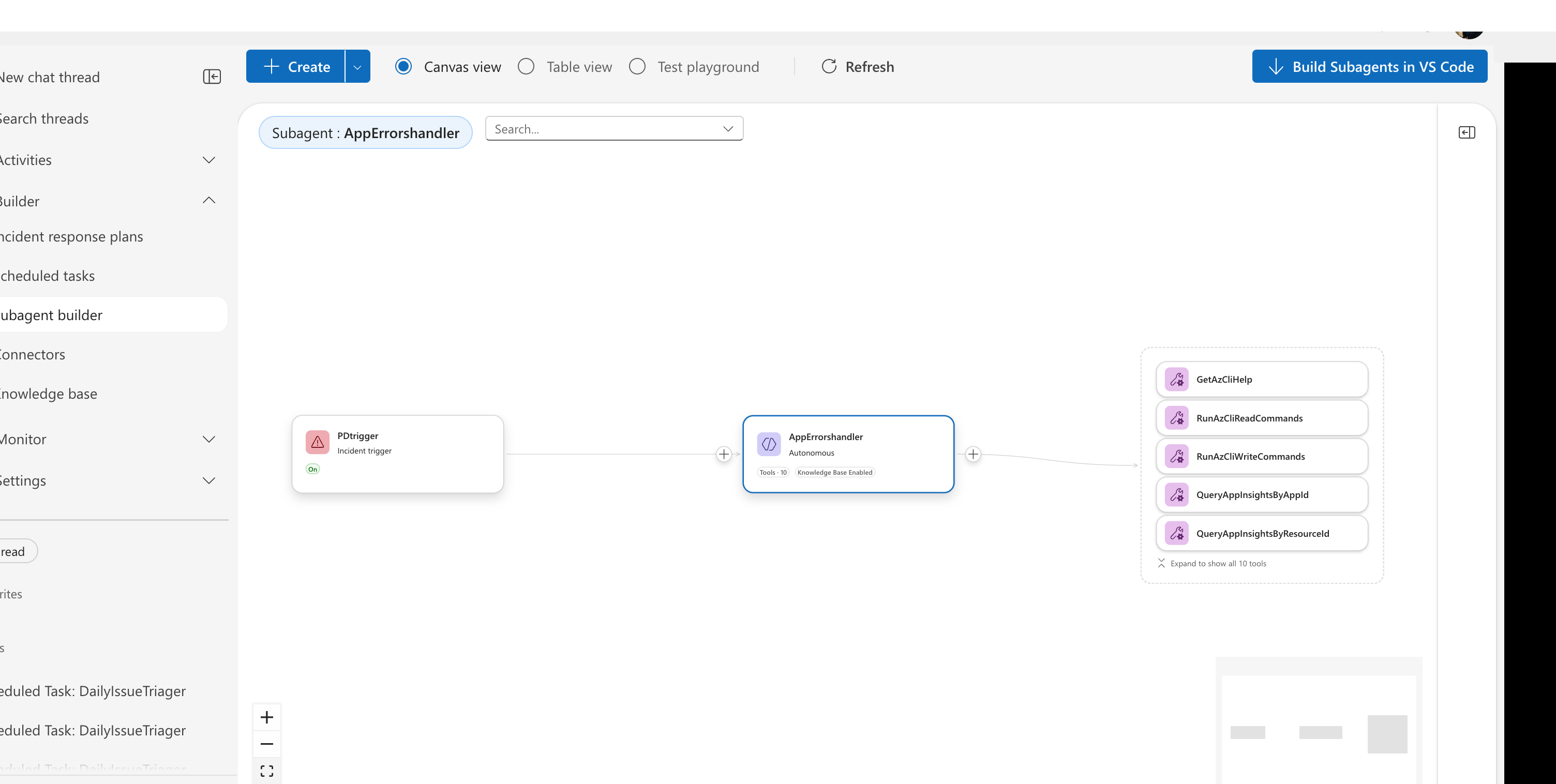
How custom agents work
Invoke a custom agent with the /agent slash command in chat. The custom agent receives the full conversation context and works with focused expertise.
A basic custom agent definition:
name: database_expert
system_prompt: |
  You are a database specialist. Analyze query performance,
  diagnose connection issues, and recommend optimizations.
handoff_description: Handles SQL and database troubleshooting
tools:
  - execute_kusto_query
  - azure_cli
connectors:
  - azure_sql
enable_skills: true  # Can use skills for additional expertise
Key properties:
system_prompt— The expert persona and instructionshandoff_description— What the orchestrator sees when deciding to delegatetools— Available capabilitiesenable_skills— Let this custom agent access skills dynamically
Skills are automatic — your agent uses them whenever relevant. Custom agents are explicit — you invoke them with /agent when you need focused expertise.
Why use custom agents?
Custom agents let you package domain expertise, tools, and knowledge for reuse. Instead of your main agent trying to handle everything, it delegates to specialists.
Consider a database issue: Without custom agents, your main agent tries generic troubleshooting. With a "Database Expert" custom agent, you get focused SQL expertise, database-specific runbooks, and tools tuned for query analysis.
Custom agents also enable handoff chains. Your incident triage custom agent classifies an issue, hands off to the appropriate domain expert, who investigates and hands off to a notification router. Each step is specialized.
Agent Canvas views
Build custom agents in Builder > Agent Canvas:
| View | Purpose |
|---|---|
| Canvas view | Visual diagram showing custom agents, tools, and trigger connections |
| Table view | List of all custom agents with quick access |
| Test playground | Interactive testing environment |
When to use custom agents
| Scenario | Use Custom Agent? | Why |
|---|---|---|
| Deep domain expertise needed | ✅ Yes | Package SQL expertise, networking knowledge, security best practices |
| Multi-step workflows | ✅ Yes | Incident triage, deployment validation, backup verification |
| Specialized tool sets | ✅ Yes | Database-specific tools, cost optimization tools |
| Simple single operations | ❌ No | Use Skills instead for simple, repeatable actions |
| Read-only queries | ❌ No | Main agent can handle without delegation |
For complete custom agent setup: See Incident Response (response automation).
Custom agent handoff
When your main agent hands off to a custom agent, they share a single conversation context. The receiving custom agent sees:
- Full conversation history — all previous messages, tool calls, and results
- Subtask reasoning — what the handoff is asking this custom agent to accomplish
- User's original question — preserved throughout the handoff chain
Custom agents don't get a "clean slate." They continue the same conversation thread. This enables handoff chains where each specialist builds on the previous agent's work.
After completing its work, the custom agent hands off to the next agent or returns control to the orchestrator. The conversation context continues to accumulate throughout the chain.
Custom agent patterns
| Pattern | Examples | Use Case |
|---|---|---|
| Domain Expert | VM Expert, AKS Expert, Network Expert | Deep expertise in one technology (all VM issues, Kubernetes troubleshooting, VNet/NSG/load balancer) |
| Task Specialist | Log Analyzer, Cost Optimizer, Security Scanner | Focused on specific tasks (parse logs, find savings, identify vulnerabilities) |
| Workflow Executor | Incident Triage, Deployment Validator, Backup Verifier | Multi-step procedures (classify incidents, post-deploy checks, test backup integrity) |
Skills vs Custom Agents vs Knowledge Files
| Feature | Skills | Custom Agents | Knowledge Files |
|---|---|---|---|
| Access | Automatic | /agent command | Via KB query tool |
| Tools | ✅ Can attach | ✅ Has tools | ❌ No tools |
| Context | Uses thread context | Shares thread context | Reference only |
| Best for | Procedures | Domain specialists | Runbooks, docs |
When to use what:
- Skill: Team-wide procedure with optional execution (AKS troubleshooting guide + Azure CLI)
- Custom Agent: Scoped specialist invoked on demand (PostgreSQL Expert)
- Knowledge File: Reference content for context (architecture docs)
Connecting custom agents to triggers
Custom agents can be triggered automatically by incidents or scheduled tasks. The canvas view shows these connections visually — triggers appear as nodes connected to custom agents, tools are grouped with their parent custom agent, and status badges show active/inactive state.
Setup: See Incident Response for connecting custom agents to incidents, or Scheduled Tasks for recurring automation.
Custom agent modes
Each custom agent operates in a mode that controls how much autonomy it has. The mode is set per response plan or scheduled task.
| Mode | Description |
|---|---|
| Review | Proposes actions, waits for approval |
| Autonomous | Acts without human approval |
Choose the mode based on risk:
- Cost optimization recommendations? → Review (human approval required)
- Well-tested automation? → Autonomous (for trusted operations)
Modes are configured per response plan or scheduled task, not in the custom agent YAML definition. See Run Modes for details.
Testing and development
Test custom agents in the Test playground before deploying. Go to Builder > Agent Canvas and select Test playground from the view toggle. The split-screen layout lets you edit instructions on the left and test in a live chat on the right — with AI-powered evaluation to score your configuration.
For VS Code users, the SRE Agent MCP server extension lets you edit custom agent YAML in your editor with changes syncing to your agent.
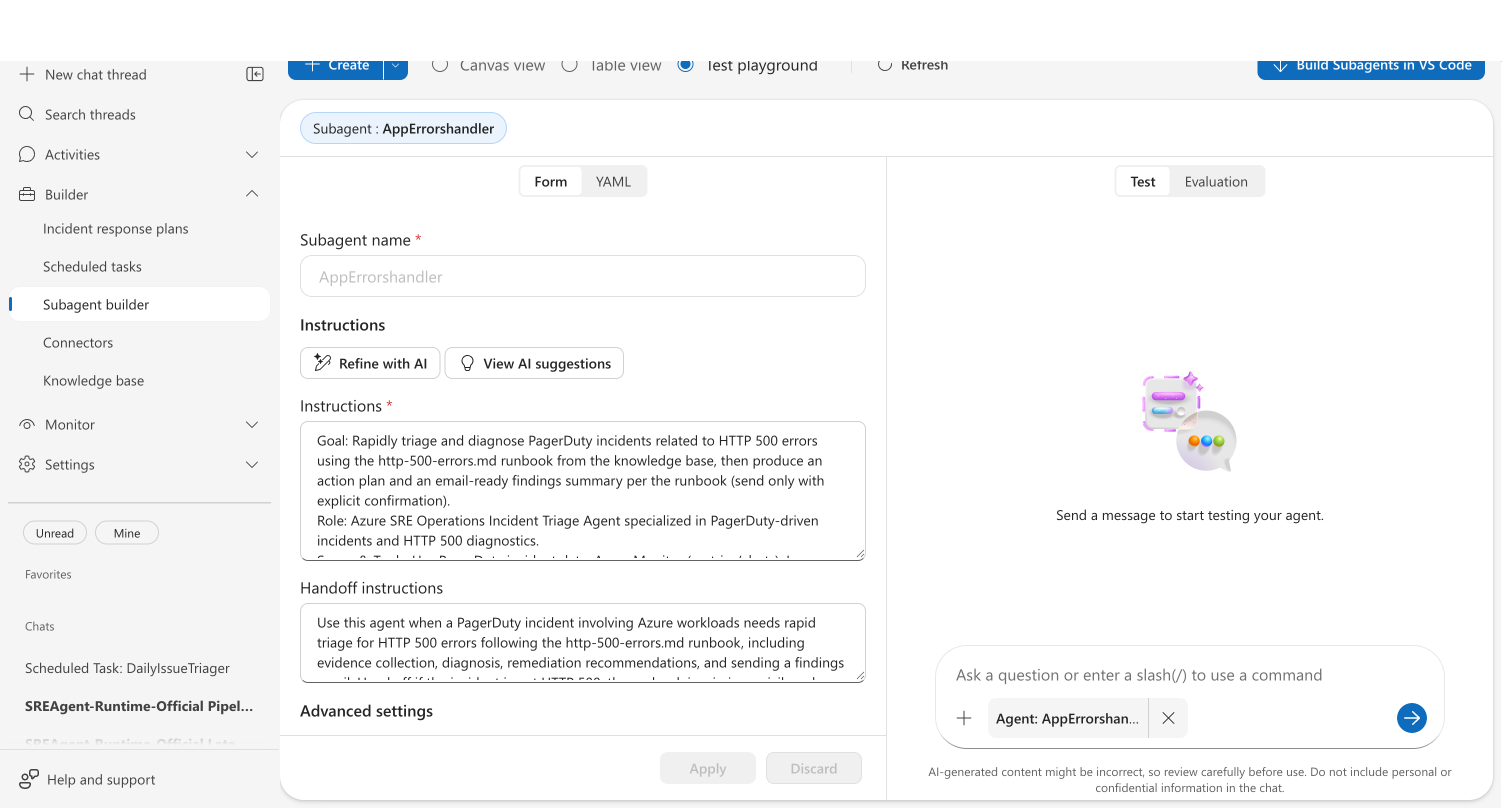
For full details, see Agent Playground.
Related
| Resource | Why it matters |
|---|---|
| Tutorial: Create a Custom Agent → | Step-by-step guide to building your first custom agent |
| Tutorial: Create a Skill → | Build skills that custom agents can use |
| Skills | Reusable procedures and tools for your agent |
| Send Notifications | Send investigation findings to Teams, Outlook, and more |