Skills
Skills extend your agent with procedures and execution capabilities. Add a troubleshooting guide, attach tools like Azure CLI, Kusto queries, Python scripts, or MCP connectors — and your agent loads them when relevant to the user's question. No explicit /skill command needed.
You can also upload knowledge documents (runbooks, architecture guides, reference material) to build a knowledge base that your agent searches automatically. See Memory & Knowledge for details on knowledge uploads.

Skills, custom agents, and knowledge files
These three concepts work together but serve different purposes:
| Feature | Skills | Custom Agents | Knowledge Files |
|---|---|---|---|
| Access | Automatic — agent loads when relevant | Explicit — invoke with /agent command | Automatic — agent searches when relevant |
| Tools | ✅ Can attach tools | ✅ Has its own tools | ❌ No tools |
| Purpose | Reusable procedures + execution | Scoped domain specialists | Reference content |
| Best for | Team-wide troubleshooting guides | Database experts, security auditors | Runbooks, architecture docs |
Skills are available to both your main agent and custom agents. When you create a custom agent in Builder > Agent Canvas, you can select which skills it has access to. Skills are not added via an enable_skills toggle — you directly choose the skills from the Choose Skills panel in the custom agent creation dialog.
In YAML, use allowed_skills to specify which skills a custom agent can access. Setting allowed_skills automatically enables skills on that agent — you don't need to also set enable_skills: true.
name: database_expert
system_prompt: |
  You are a database specialist.
allowed_skills:
  - postgres-troubleshooting
  - connection-pool-guide
tools:
  - execute_kusto_query
How skills work
A skill combines knowledge with optional tools:
| Component | Purpose |
|---|---|
| SKILL.md | Procedural guidance the agent follows |
| Tools | Azure CLI, Kusto queries, Python scripts the skill can execute |
| Supporting files | Runbooks, architecture docs, reference material |
Your agent decides which skill to load based on the skill's description and your question. The agent reads the skill descriptions in its system prompt and automatically loads the most relevant skill by reading its SKILL.md file — no explicit command needed.
Why use skills?
Without skills, your agent relies on its built-in knowledge. This works for general Azure operations, but lacks your team's specific procedures.
With skills, you add:
- Your troubleshooting workflows — step-by-step guides for your systems
- Execution capability — tools that run commands, not just describe them
- Organizational context — architecture docs, naming conventions, escalation paths
Skills turn your agent from a general assistant into a team member who knows how you operate.
Creating skills
Skills are created in Builder > Skills. A skill includes a SKILL.md file with procedural guidance and optional tool attachments for execution.
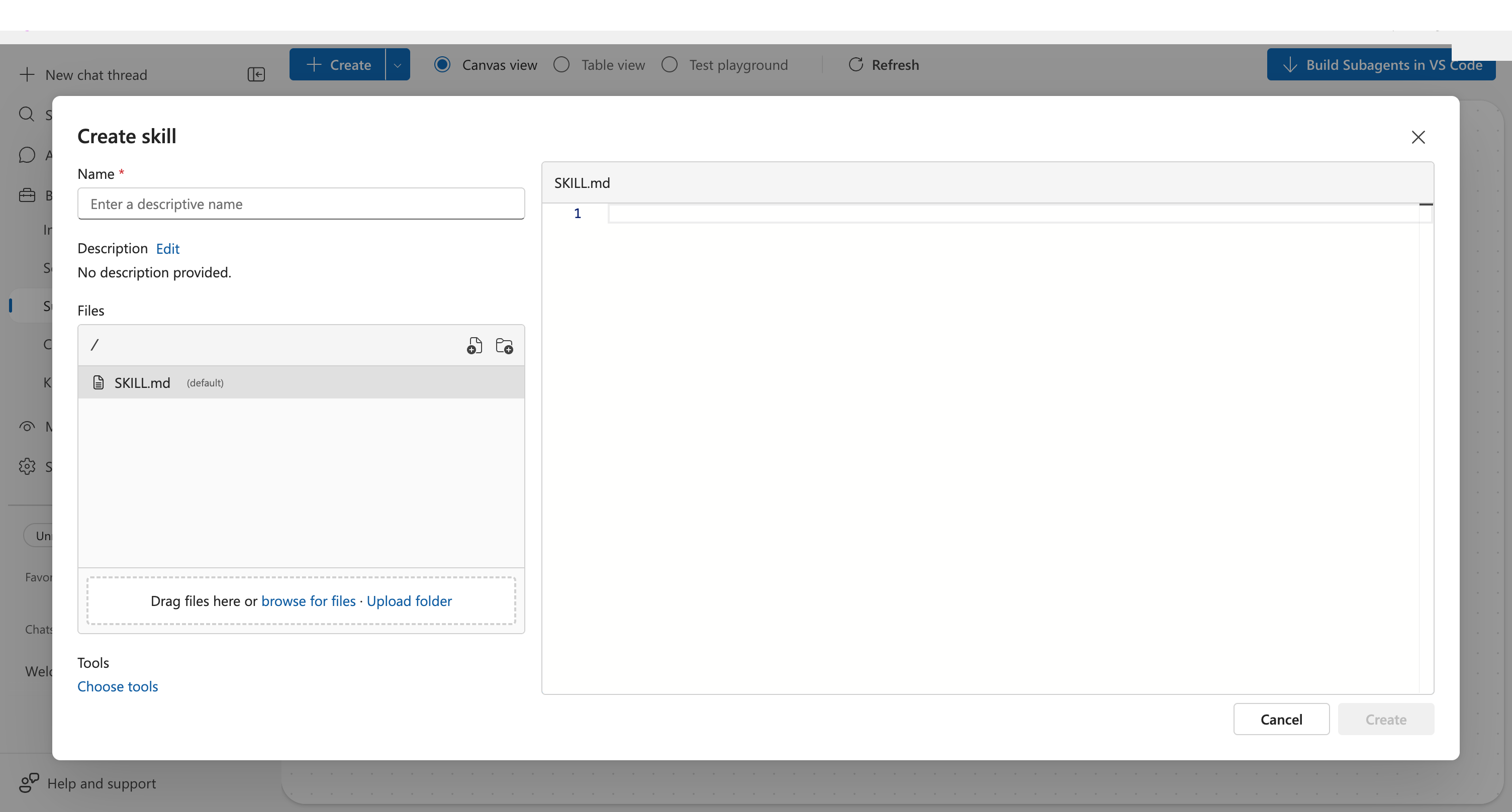
name: aks-troubleshooting-guide
description: Use when investigating AKS or Kubernetes issues
files:
  - SKILL.md
tools:
  - RunAzCliReadCommands
Your agent automatically applies skill guidance when encountering relevant issues — and executes attached tools to gather information.
Attaching tools
Skills use the same tool picker as custom agents. You can attach any combination of:
| Tool type | Examples |
|---|---|
| Azure CLI | RunAzCliReadCommands, RunAzCliWriteCommands, GetAzCliHelp |
| Kusto/Log Analytics | Custom Kusto queries against ADX or Log Analytics |
| Python | Custom Python scripts for data processing or API calls |
| MCP | Tools from connected MCP servers |
| Link | URL templates for external systems |
When you attach RunAzCliReadCommands to an AKS troubleshooting skill, your agent doesn't just know how to troubleshoot — it can actually run the commands.
Limits and constraints
| Constraint | Value |
|---|---|
| Active skills | Maximum 5 concurrent |
| Skill lifecycle | Oldest auto-unloaded when limit exceeded |
| Context reset | Active skills clear on conversation compaction |
| Tool access | Only available while skill is active |
If you need a skill's tools after it's been unloaded, the agent re-reads its SKILL.md file to reactivate it.
Related
| Resource | Why it matters |
|---|---|
| Tutorial: Create a Skill → | Step-by-step guide to building your first skill |
| Custom Agents → | Build specialized agents that can use skills |
| Tools → | Learn about the tools skills can attach |
| Kusto Tools → | Kusto query tools that skills can use |
| Python Code Execution → | Python tools available to skills |