Python Tools
- Extend your agent to reach systems it doesn't have built-in support for
- Connect to internal APIs, on-prem databases, multi-cloud platforms
- Encode custom business logic (SLA calculations, cost models, compliance rules)
The problem
Your agent has powerful built-in tools for Azure—Kusto queries, Azure Monitor, ARM operations. But your organization doesn't live entirely in Azure:
- Internal systems: CMDB databases, custom ticketing systems, internal APIs that only your org uses
- Multi-cloud: Datadog dashboards, Splunk logs, AWS CloudWatch metrics alongside Azure
- Legacy infrastructure: On-prem databases, proprietary protocols, systems without modern APIs
- Custom business logic: SLA calculations specific to your contracts, cost allocation formulas, capacity planning models
The agent can diagnose Azure issues, but it can't reach your internal systems or apply your organization's unique logic—unless you extend it.
How Python tools work
Python tools let you teach your agent new capabilities. Describe what you need, generate the code, test it, and deploy—your agent can now reach systems and apply logic that weren't possible before.
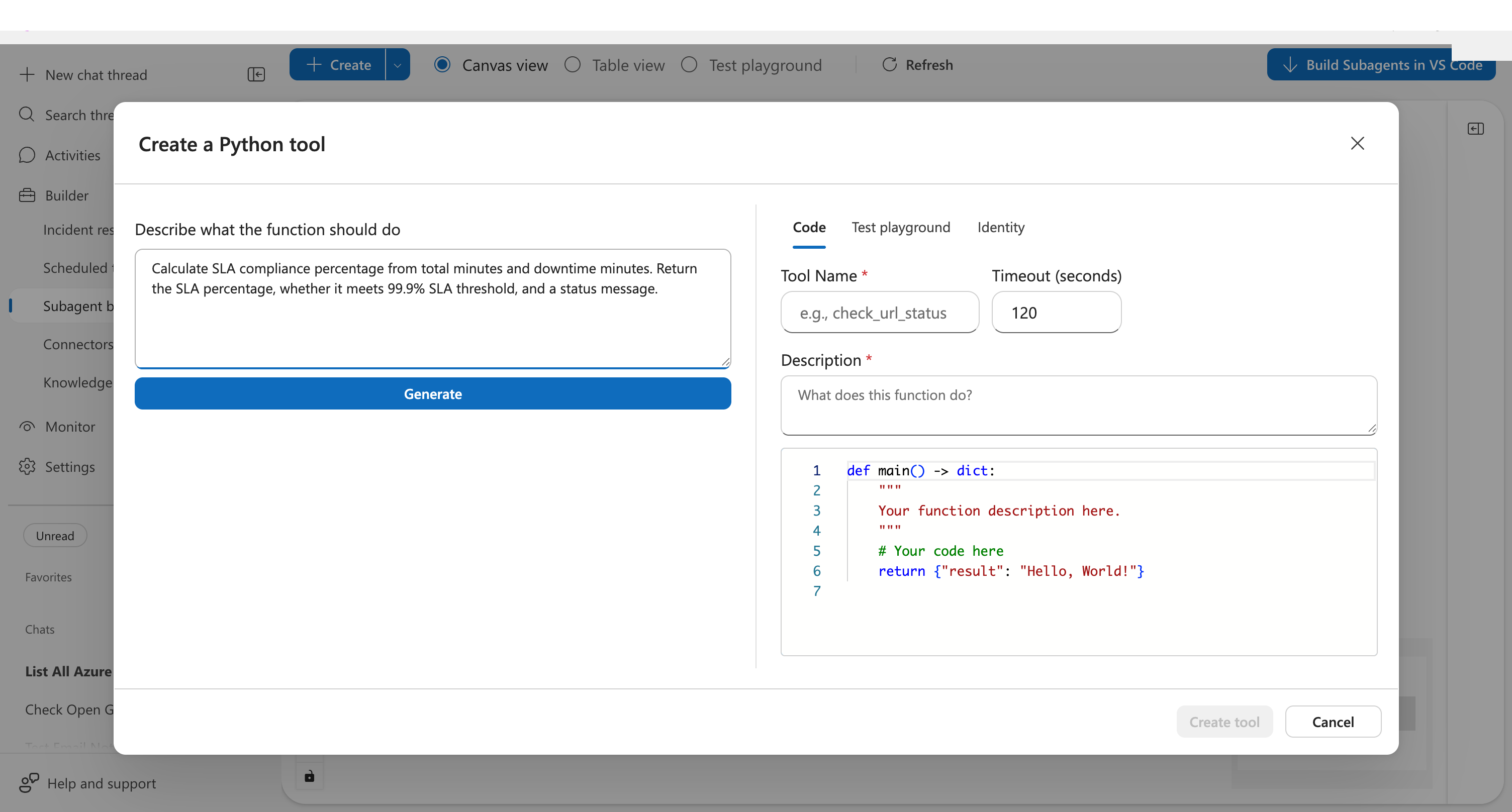
The generated code follows a consistent pattern:
- A
main()function that accepts typed parameters - JSON-serializable return values
- Descriptive docstrings explaining the logic
Before creating the tool, test it with real inputs in the playground. Enter parameter values, click Test, and see actual results—not just syntax validation.
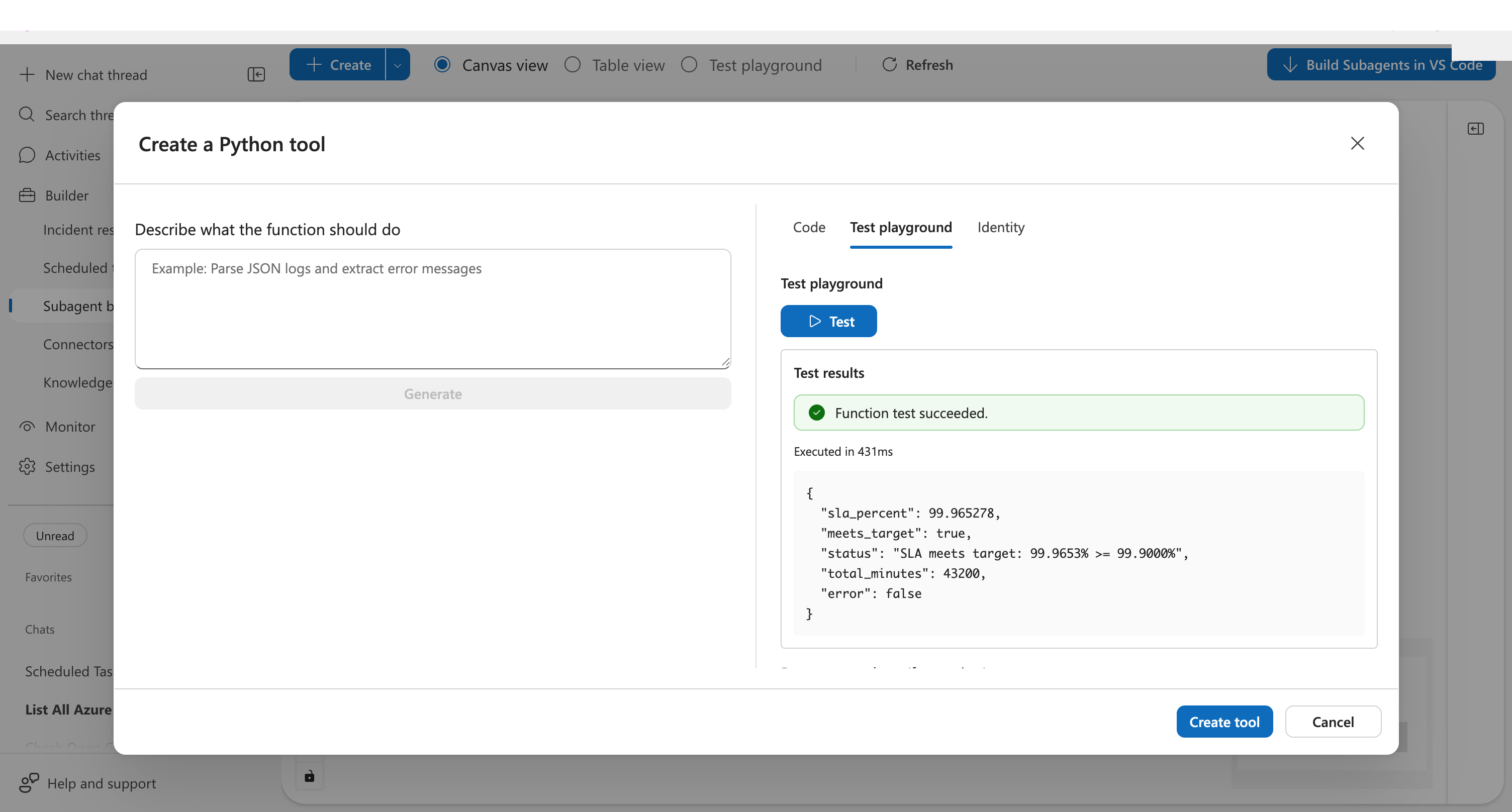
Once tested, click Create tool. Your agent can immediately use it—no restart, no deployment pipeline.
Python tools vs MCP connectors
For third-party platforms, you have two options:
| Approach | Best for | Examples |
|---|---|---|
| MCP connectors | Popular platforms with standard APIs | Datadog, Splunk, ServiceNow, GitHub |
| Python tools | Internal systems, custom logic, platforms without MCP | Your CMDB, proprietary APIs, custom calculations |
Use MCP connectors when: A connector exists for your platform. MCP provides structured schemas, authentication management, and consistent behavior.
Use Python tools when: You need to reach internal systems, encode custom business logic, or connect to platforms without MCP support.
What makes this different
| Without Python tools | With Python tools |
|---|---|
| Agent can only use built-in capabilities | Agent reaches any system Python can call |
| Internal APIs require separate workflows | Internal systems become agent tools |
| Custom logic lives in external scripts | Business rules execute within agent conversations |
| On-prem systems disconnected from agent | Hybrid environments fully accessible |
Python tools turn your agent from an Azure-native assistant into an extensible platform that works with your entire infrastructure.
Before and after
| Before | After |
|---|---|
| "Our CMDB is on-prem, agent can't see it" | Python tool with network access queries internal systems |
| "We have custom SLA formulas nobody has automated" | Encode your formulas as a tool, agent applies them automatically |
| "Compliance reports need specific PDF formatting" | Generate reports with ReportLab, serve via agent |
Prerequisites
- Builder access to an SRE Agent
- For HTTP endpoints: URL and authentication credentials for your target systems
How to create a Python tool
| Approach | You provide | Agent does | Best for |
|---|---|---|---|
| Describe in plain English | "Calculate SLA from uptime and downtime" | Generates complete Python code | Quick custom logic, no coding needed |
| Paste existing code | Your Python function | Wraps it as a tool | Migrating existing scripts, complex logic |
| Call HTTP endpoints | Endpoint URL + auth | Calls your API via HTTP | Azure Functions, Lambda, internal APIs, webhooks |
Option 1: Let AI write the code
Describe what you need in the dialog. Click Generate. AI creates a working Python function with typed parameters, error handling, and docstrings.
You describe: "Calculate SLA compliance from uptime and downtime minutes, return whether it meets 99.9% threshold"
Agent generates: Complete main() function ready to test and deploy.
Option 2: Bring your own code
Paste existing Python into the Code tab. Must follow the pattern:
def main(param1: str, param2: int) -> dict:
    # Your logic here
    return {"result": "value"}
Option 3: Call HTTP endpoints
Wrap any HTTP endpoint—Azure Functions, AWS Lambda, internal APIs, webhooks—as a Python tool:
def main(input_data: str) -> dict:
    import requests

    # Azure Function with function key
    response = requests.post(
        "https://your-func.azurewebsites.net/api/endpoint?code=YOUR_FUNCTION_KEY",
        json={"data": input_data}
    )

    # Or internal API with bearer token
    # response = requests.get(
    #     "https://internal-api.corp/resource",
    #     headers={"Authorization": "Bearer YOUR_TOKEN"}
    # )

    return response.json()
Python tools have outbound network access. You can call any HTTP endpoint your network allows. For authenticated endpoints, include API keys or tokens in headers/query parameters.
Verify your tool works
After creating the tool, test it in a new chat:
Calculate SLA for 43185 minutes uptime and 15 minutes downtime
Your agent should recognize the task matches your tool and call it automatically.
Example scenarios
Internal CMDB query:
def main(server_name: str) -> dict:
    """Query internal CMDB for server configuration."""
    import requests
    response = requests.get(f"https://cmdb.internal.corp/api/servers/{server_name}")
    return response.json()
Custom SLA calculation:
def main(uptime_minutes: int, downtime_minutes: int) -> dict:
    """Calculate SLA using your organization's formula."""
    total = uptime_minutes + downtime_minutes
    sla = (uptime_minutes / total) * 100 if total > 0 else 100.0
    return {"sla_percent": round(sla, 4), "meets_target": sla >= 99.9}
Compliance report generation:
def main(incidents: list, month: str) -> dict:
    """Generate PDF compliance report."""
    from reportlab.platypus import SimpleDocTemplate
    doc = SimpleDocTemplate(f"/mnt/data/compliance-{month}.pdf")
    # Build report...
    return {"report_path": f"/api/files/compliance-{month}.pdf"}
Execution environment
| Property | Value |
|---|---|
| Timeout | 5–900 seconds (default: 120) |
| Isolation | Fresh container per execution |
| File system | /mnt/data for temporary files |
| Network | Outbound connectivity enabled |
| Packages | 700+ preinstalled (pandas, requests, azure-identity, reportlab, etc.) |
| State | No persistence between calls |
Authentication for Azure resources
Python tools can authenticate to Azure resources using managed identity with preset scopes:
| Scope | Access |
|---|---|
| ARM | Azure Resource Manager (management.azure.com) |
| Key Vault | Secrets, keys, certificates (vault.azure.net) |
| Storage | Blob, queue, table storage (storage.azure.com) |
Enable authentication in the Identity tab when creating a tool.
from azure.identity import DefaultAzureCredential
from azure.keyvault.secrets import SecretClient

# AZURE_CLIENT_ID is set automatically — DefaultAzureCredential uses it
credential = DefaultAzureCredential()
client = SecretClient(
    vault_url="https://my-vault.vault.azure.net",
    credential=credential
)
secret = client.get_secret("my-secret")
Alternatively, pass AZURE_CLIENT_ID explicitly to ManagedIdentityCredential:
import os
from azure.identity import ManagedIdentityCredential

credential = ManagedIdentityCredential(client_id=os.environ["AZURE_CLIENT_ID"])
Limitations
- No persistent state: Each execution starts fresh. Store results externally if needed.
- Timeout maximum: 900 seconds (15 minutes) for long-running operations.
- No GPU: CPU-only execution environment.
- JSON output required: Return values must be JSON-serializable.
Get started
| Resource | What you'll learn |
|---|---|
| Create a Python tool → | Step-by-step tutorial |
Related capabilities
| Capability | What it adds |
|---|---|
| Tools overview → | All tool types your agent can use |
| Connectors → | Built-in integrations for common platforms |