Cross-Tenant Connector Access
Your agent runs in one Entra ID tenant but needs to reach Azure DevOps or Kusto in another. Pick one auth method:
- Managed Identity + FIC - durable, unattended, recommended for production
- OAuth sign-in - fastest path for validation, uses your user identity
- PAT - fallback when FIC and OAuth aren't available
This page covers outbound access (your agent reaching another tenant's services).
When you need this
When your agent runs in one Entra ID tenant but the services it needs (Azure DevOps repos, Kusto databases) live in a different tenant, the agent's managed identity can't directly authenticate across that boundary. Without cross-tenant access, the agent is isolated - it runs in its own tenant but can't reach the code, documentation, or data that makes it useful.
Three auth methods bridge that boundary. Pick one based on your scenario.
Choose your auth method
| Method | Best for | Setup | Cross-tenant works because |
|---|---|---|---|
| Managed Identity + FIC | Production. Durable, unattended, no token expiry, not tied to a user. | One-time multi-tenant app registration in your agent tenant + a Federated Identity Credential trusting your agent's MI. | The MI authenticates as a multi-tenant app registration in your tenant, whose service principal has been consented into the target tenant. |
| OAuth sign-in | Validation. Fastest way to confirm permissions before investing in the FIC plumbing. | Browser sign-in with a user account that has access to both tenants. | The OAuth token represents you (a user with cross-tenant access), not the agent's MI, so it works without app registrations. |
| PAT | Fallback. When FIC and OAuth aren't available, or for one-off scripted setups. | Generate a Personal Access Token in the target tenant ADO. | The PAT is a static credential bound to a user with target-tenant access. |
Recommended path: start with OAuth to validate the agent has the right permissions in the target tenant, then switch to MI + FIC for production durability. Use PAT only as a fallback - Microsoft Entra tokens, managed identities, and service principals are the recommended Azure DevOps authentication methods, since PATs are long-lived static credentials tied to a user account (revoked when the user leaves) and a common leak vector.
What you can do cross-tenant
| Scenario | Service | Auth methods | Where to configure |
|---|---|---|---|
| Read ADO repo content (clone the repo into the agent's workspace and search it during investigations) | Azure DevOps | MI + FIC, OAuth, or PAT | Knowledge sources -> Add repository wizard |
| Comment on ADO work items and PRs (and create work items) | Azure DevOps | MI + FIC, OAuth, or PAT | Azure DevOps OAuth connector, or PAT/MI configured in the Add Repository dialog (used by the same per-org config the write path reads from) |
| Query Kusto databases | Azure Data Explorer | MI + FIC | Kusto connector |
Reading ADO repos uses the knowledge-source path. Writing to ADO (work items, PR comments) flows through the Azure DevOps MCP connector, which reads from the same per-organization auth config (so whichever method you set up - OAuth, PAT, or MI + FIC - the MCP connector picks it up). Make sure the identity has the right ADO permissions for what you want to do - for work items the granular permission is Edit work items in this node on the target Area Path (the Contributors group has it by default), and for PR comments it's Contribute to pull requests on the target repo.
Prerequisites
Before you configure any cross-tenant connector:
- An agent deployed in a different tenant than the target service.
- For MI + FIC: an Entra ID multi-tenant app registration in your agent tenant (not the target tenant), with a Federated Identity Credential trusting your agent's managed identity. The app's service principal must be consented into the target tenant.
- The identity (service principal for FIC, user for OAuth, token owner for PAT) must have the right permissions in the target service:
| Service | Permission |
|---|---|
| Azure DevOps - read repos | ADO project Reader (covers code repos and wiki repos) |
| Azure DevOps - write work items | Edit work items in this node on the target Area Path (in the Contributors group by default) |
| Azure DevOps - PR comments | Contribute to pull requests on the target repo (in the Contributors group by default) |
| Kusto | Database Viewer on the target database |
Set it up
Using Managed Identity + FIC:
Using OAuth:
How MI + FIC works under the hood
You don't need to read this section to set FIC up - it's here if you want to understand what the platform is doing on your behalf.
When your agent uses MI + FIC to authenticate cross-tenant:
- The agent's managed identity requests a token with scope
api://AzureADTokenExchange/.default. - That token is used as a client assertion to authenticate as a multi-tenant app registration in the agent tenant.
- Entra ID validates the assertion against the Federated Identity Credential configured on that app registration.
- The matching service principal (consented into the target tenant) is what ADO or Kusto authorize against - your agent ends up acting as that service principal in the target tenant.
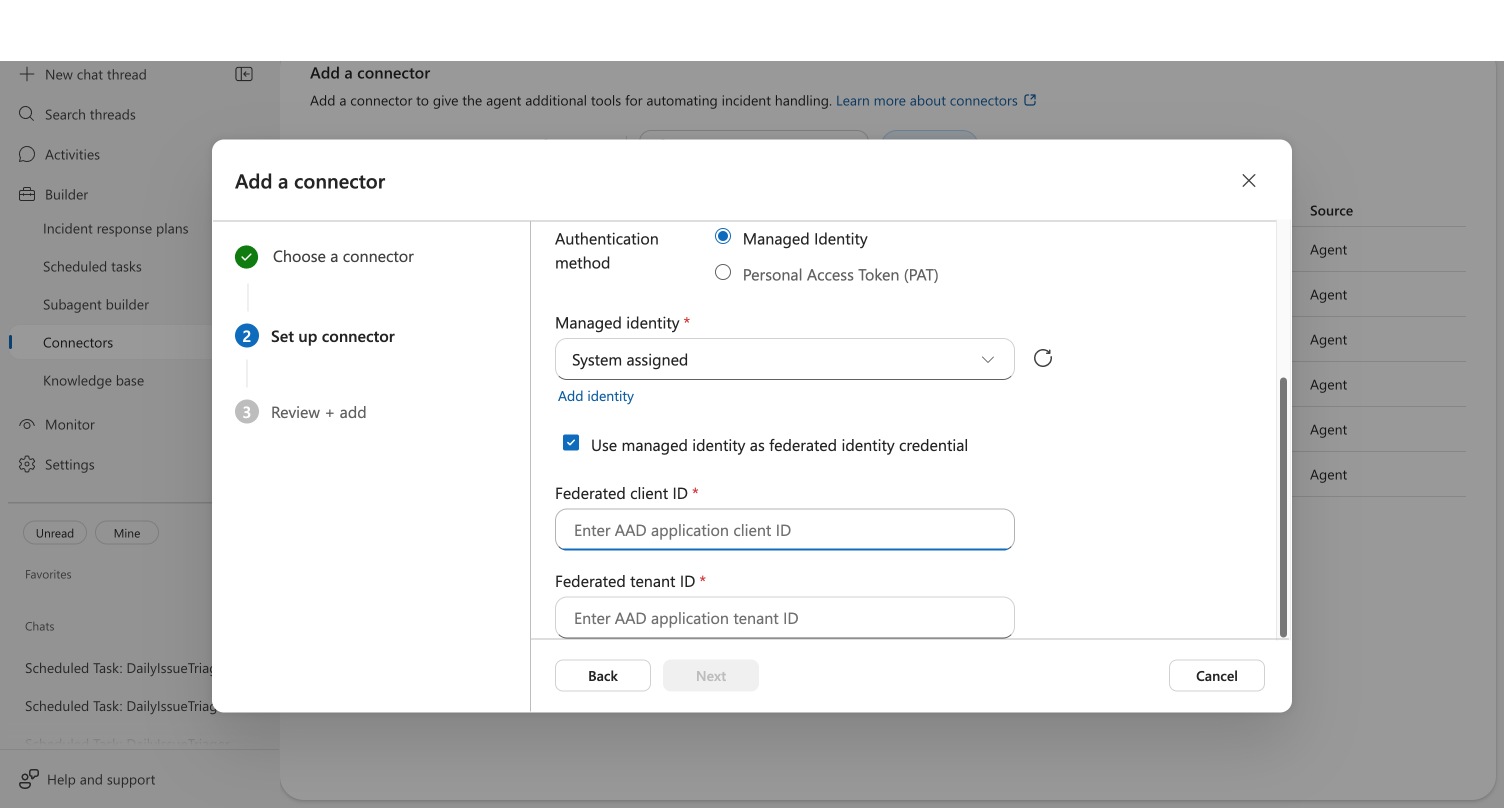
The key insight: the federated client ID and federated tenant ID point at the multi-tenant app registration in the agent's own tenant, not the target tenant. The cross-tenant link comes from the service principal that lives in the target tenant.
How OAuth cross-tenant works
You don't need to read this section to use OAuth - it's here if you want to understand what's happening when you click Sign in to Azure DevOps.
When you initiate the OAuth flow:
- The portal opens a Microsoft sign-in popup using MSAL (Microsoft Authentication Library) with account selection.
- You pick (or sign in with) any Microsoft account, including one from a different tenant than the agent.
- Entra ID issues an Azure DevOps access token bound to your identity in the selected tenant - not the agent's managed identity.
- The token is stored on the connector and refreshed automatically; the agent uses it for ongoing ADO access from that organization.
Because the token represents you, it inherits your cross-tenant ADO permissions and works without any FIC, app registration, or service principal in the target tenant. The trade-off is that the connector stops working when your sign-in lapses or you change roles - so for unattended production use, set up MI + FIC on the same agent and the Azure DevOps MCP connector will use it for that organization automatically.
Connectors not affected by cross-tenant
These connectors work the same regardless of which tenant your agent is deployed in:
- Outlook, Teams - use your Graph token from browser sign-in (user-scoped)
- GitHub - external service, not Entra ID tenant-scoped
- Third-party observability (Datadog, Splunk, etc.) - external APIs with their own auth
Related capabilities
| Capability | What it adds |
|---|---|
| Azure DevOps as a Knowledge Source | Add ADO repos and wikis through the unified Knowledge Sources flow |
| ADO Connector | Azure DevOps connector overview |
Troubleshooting
Cross-Tenant ADO Tutorial -> Troubleshooting - common FIC and ADO connector errors with fixes.