Audit Agent Actions
- Every agent action — tool calls, model generations, incident handling, approvals — is logged to your Application Insights resource
- Query the
customEventstable using KQL to see exactly what your agent did, when, and why - Access logs directly from Monitor → Logs in the agent portal
- 9 distinct event types capture the full audit trail from user message to agent response
The problem: understanding what your agent did
Your agent investigates incidents, runs tools, and takes actions — but without visibility into those actions, you can't answer basic questions: What tools did the agent use? How many tokens did each investigation consume? Which response plans are producing results? Did the agent act autonomously, or did it wait for approval?
You need a queryable audit trail — not just outcomes, but the full chain of reasoning, tool execution, and decision-making.
Where to find your logs
Your agent automatically logs all actions to Azure Application Insights. An Application Insights resource is provisioned alongside your agent during creation.
To open your logs:
- In the agent portal, go to Monitor → Logs
- This opens your agent's Application Insights resource in the Azure Portal
- Use KQL (Kusto Query Language) to query the
customEventstable
The default query is traces | where timestamp > ago(1d). Change this to customEvents to see agent action telemetry.
Event types
Your agent logs 9 custom event types to the customEvents table. This query shows all event types and their counts:
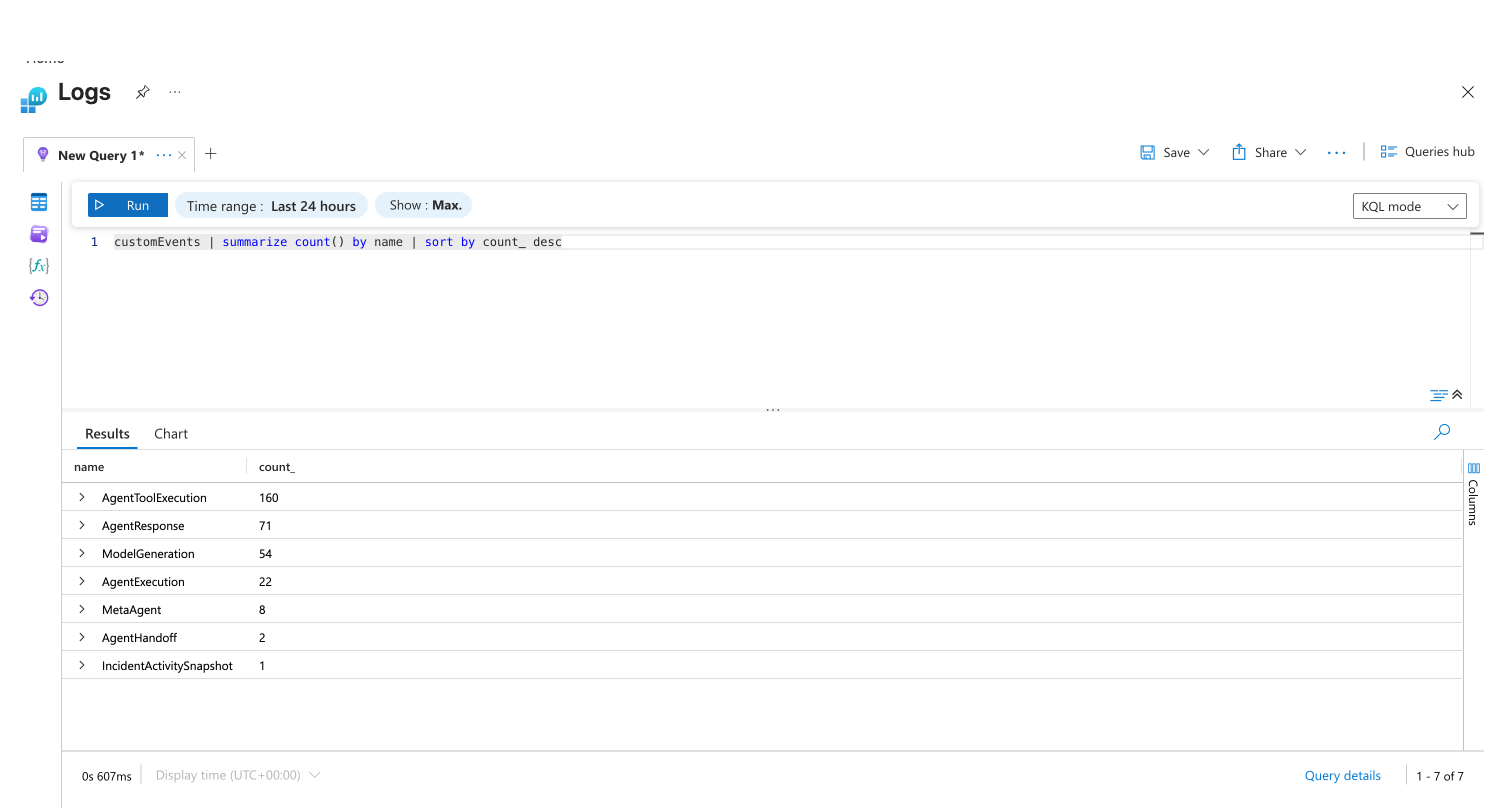
| Event name | What it captures | Typical volume |
|---|---|---|
AgentResponse | Chat responses sent to you | High |
ModelGeneration | Every LLM call (input/output tokens, model ID) | High |
AgentToolExecution | Every tool call (name, input, output) | High |
AgentExecution | Agent session start/end lifecycle | Medium |
MetaAgent | Agent routing and orchestration decisions | Medium |
AgentHandoff | Cross-agent handoffs | Medium |
IncidentActivitySnapshot | Incident lifecycle (severity, status, mitigation outcome) | Low |
AgentAzCliExecution | Azure CLI commands run by the agent | Low |
ApprovalDecision | Your approval or rejection of proposed actions | Low |
Key events and their fields
Tool execution (AgentToolExecution)
Logged every time your agent calls a tool.
| Field | Description | Example value |
|---|---|---|
EventType | ToolStart or ToolEnd | ToolStart |
ToolName | Name of the tool | SearchResource |
ToolInput | Arguments passed | {"resourceTypes": ["microsoft.resources/subscriptions"]} |
ToolOutput | Result returned (end only) | (tool output JSON) |
SubAgentName | Agent that invoked the tool | meta_agent |
CallId | Correlation ID for pairing | call_3DDMpLtzCljW... |
customEvents
| where name == "AgentToolExecution"
| where customDimensions.EventType == "ToolStart"
| where timestamp > ago(7d)
| project timestamp,
    Tool = tostring(customDimensions.ToolName),
    Input = tostring(customDimensions.ToolInput)
| sort by timestamp desc
Incident lifecycle (IncidentActivitySnapshot)
Logged for every incident your agent handles — captures the full lifecycle from creation to resolution.
| Field | Description | Example value |
|---|---|---|
IncidentId | Platform incident ID | Q2VVG0T8K7AL0J |
IncidentTitle | Incident description | DailyIssueTriager blocked: cannot access repo |
IncidentSeverity | Severity from your platform | Not set |
IncidentStatus | Current status | active |
IncidentPlatform | Source platform | PagerDuty |
IncidentMitigatedByAgent | Whether agent resolved it | True or False |
IncidentAssistedByAgent | Whether agent helped investigate | True or False |
AgentAutonomyLevel | How the agent handled it | autonomous or review |
ResponsePlanId | Which response plan was used | PDtrigger |
ResponsePlanCustom | Default or custom plan | True or False |
IncidentImpactedService | Affected service | SRE Agent |
IncidentCreatedOn | When incident was created | ISO 8601 datetime |
IncidentHandledOn | When agent started handling | ISO 8601 datetime |
IncidentMitigatedOn | When resolved (if mitigated) | ISO 8601 datetime |
// Incident outcomes over the last 30 days
customEvents
| where name == "IncidentActivitySnapshot"
| where timestamp > ago(30d)
| project timestamp,
    IncidentId = tostring(customDimensions.IncidentId),
    Title = tostring(customDimensions.IncidentTitle),
    Platform = tostring(customDimensions.IncidentPlatform),
    MitigatedByAgent = tostring(customDimensions.IncidentMitigatedByAgent),
    AssistedByAgent = tostring(customDimensions.IncidentAssistedByAgent),
    Autonomy = tostring(customDimensions.AgentAutonomyLevel),
    ResponsePlan = tostring(customDimensions.ResponsePlanId)
| sort by timestamp desc
Model generation (ModelGeneration)
Logged for every LLM call — tracks token usage, model selection, and the requesting agent.
| Field | Description | Example value |
|---|---|---|
EventType | ModelGenerationStart, ModelGenerationEnd, or ModelGenerationError | ModelGenerationEnd |
AgentName | Agent that made the LLM call | meta_agent |
ModelId | Model used | gpt-4o |
InputTokens | Tokens in the prompt | 29828 |
OutputTokens | Tokens in the response | 871 |
ThreadId | Conversation thread | bb171c1f-3bb2-4895-... |
// Token usage by agent in the last 7 days
customEvents
| where name == "ModelGeneration"
| where customDimensions.EventType == "ModelGenerationEnd"
| where timestamp > ago(7d)
| extend Agent = tostring(customDimensions.AgentName),
    InputTokens = toint(customDimensions.InputTokens),
    OutputTokens = toint(customDimensions.OutputTokens),
    Model = tostring(customDimensions.ModelId)
| summarize TotalInput = sum(InputTokens),
    TotalOutput = sum(OutputTokens),
    Calls = count()
    by Agent, Model
| sort by TotalInput desc
Approval decisions (ApprovalDecision)
Logged when you approve or reject a proposed agent action.
// All approval decisions
customEvents
| where name == "ApprovalDecision"
| where timestamp > ago(30d)
| project timestamp, customDimensions
Common queries
What did my agent do in a specific thread?
customEvents
| where timestamp > ago(7d)
| where tostring(customDimensions.ThreadId) == "YOUR_THREAD_ID"
| project timestamp,
    Event = name,
    EventType = tostring(customDimensions.EventType),
    Tool = tostring(customDimensions.ToolName),
    Agent = tostring(customDimensions.SubAgentName)
| sort by timestamp asc
Which tools are used most often?
customEvents
| where name == "AgentToolExecution"
| where customDimensions.EventType == "ToolStart"
| where timestamp > ago(30d)
| summarize Count = count() by Tool = tostring(customDimensions.ToolName)
| sort by Count desc
| take 20
How many incidents did the agent mitigate vs. assist?
customEvents
| where name == "IncidentActivitySnapshot"
| where timestamp > ago(30d)
| summarize
    Total = count(),
    MitigatedByAgent = countif(tostring(customDimensions.IncidentMitigatedByAgent) == "True"),
    AssistedByAgent = countif(tostring(customDimensions.IncidentAssistedByAgent) == "True")
Daily token consumption trend
customEvents
| where name == "ModelGeneration"
| where customDimensions.EventType == "ModelGenerationEnd"
| where timestamp > ago(30d)
| extend InputTokens = toint(customDimensions.InputTokens),
    OutputTokens = toint(customDimensions.OutputTokens)
| summarize TotalTokens = sum(InputTokens) + sum(OutputTokens) by bin(timestamp, 1d)
| render timechart
Shared fields on all events
Every custom event includes these fields for correlation and tracing:
| Field | Description |
|---|---|
gen_ai.agent.id | ARM resource ID of your agent |
gen_ai.agent.name | Agent name |
TraceId | OpenTelemetry trace ID — correlates events across a single request |
SpanId | OpenTelemetry span ID |
ParentSpanId | Parent span for call hierarchy |
ThreadId | Conversation thread GUID |
LogTimestamp | ISO 8601 timestamp |
CorrelationId | Short correlation ID for log grouping |
Use TraceId to follow a single request from user input through agent reasoning, tool calls, and response.
Azure Activity Log
For Azure resource-level operations (creating, updating, or deleting the agent resource itself), use the Azure Activity Log. This captures all ARM-level operations on your agent, managed identity, and Application Insights resources.
Access the Activity Log in the Azure Portal under your agent's resource group.
Get started
Audit logging is enabled automatically for every agent. Open Monitor → Logs in the agent portal to query action history with KQL.
| Resource | What you'll learn |
|---|---|
| Create a Kusto Tool → | Build reusable KQL queries to mine your audit data |
| Permissions → | How RBAC controls who can query audit data |
Related capabilities
| Capability | What it adds |
|---|---|
| Track Incident Value → | Visual dashboards built on IncidentActivitySnapshot telemetry |
| Monitor Agent Usage → | AAU consumption tracking and session insights |
| Run Modes → | How ReadOnly, Review, and Autonomous affect agent behavior |
| Permissions → | Azure RBAC and data-plane permission model |