Plugin Marketplace
- Install agent skills and MCP integrations from GitHub or Azure DevOps marketplaces
- Supports public and private repositories, including GitHub Enterprise
- Each installation is pinned to a specific git commit. Updates are manual unless you turn on auto-update.
The problem
SRE and platform teams build operational skills for their services: investigation runbooks, compliance checks, cost analysis playbooks, deployment verification procedures. These skills are valuable beyond the team that wrote them. Other teams running similar infrastructure benefit from the same automation.
Sharing skills across an organization requires a consistent way to package them, distribute them, control who can access them, and manage versions across multiple agents. A platform team maintaining skills for 10 service teams needs to publish once and let each team install on their own schedule, without changes propagating unexpectedly.
The Plugin Marketplace provides this distribution model for Azure SRE Agent.
What is a plugin?
A plugin is a portable, installable package of agent capabilities stored in a Git repository. A plugin can contain:
| Component | What it adds to your agent |
|---|---|
| Skills | Investigation runbooks, troubleshooting playbooks, operational procedures |
| MCP servers | Tool integrations that configure as connectors with pre-filled endpoints and auth |
A marketplace is a GitHub or Azure DevOps repository that bundles plugins under a marketplace.json manifest. Teams publish a marketplace, and other teams browse and install from it. Each plugin is installed independently and pinned to a specific version.
What the Plugin Marketplace does
Discover and install plugins from repository marketplaces. Register a marketplace with its repository URL. Two featured public GitHub marketplaces are:
- Azure SRE Agent Plugins — official SRE Agent skills and integrations
- Claude Plugins — Anthropic's reference Claude plugins
Open Plugins, select Connect marketplace, and enter the repository URL. If you already have marketplaces, select Add marketplace in the list that opens first. The repository clones in the background, and a notification tells you when its plugins are ready.
Private repos and GitHub Enterprise. GitHub marketplaces use the agent's configured GitHub identity or an explicit marketplace PAT for github.com. GitHub Enterprise (*.ghe.com) uses a GitHub App. See the GitHub Connector for authentication setup.
Azure DevOps marketplaces
Enter the repository's HTTPS clone URL:
https://dev.azure.com/<organization>/<project>/_git/<repository>https://<organization>.visualstudio.com/<project>/_git/<repository>
Remove the <organization>@ prefix that Azure DevOps adds when you copy a clone URL. URLs that include DefaultCollection aren't supported.
The marketplace uses the organization's connection from Builder > Code access. If there isn't a working one, you can set it up in the same dialog with your account, a PAT, or a managed identity. See Add a private marketplace.
Shared credential boundary
Repository operations use the agent's credential, not the installing user's identity. For Azure DevOps, that's the organization's Code access connection, shared with every marketplace in that organization.
- The repository provider checks the agent's credential. SRE Agent does not check each user's personal repository permissions.
- SRE Agent RBAC controls who can use it. Any user with the Author or Administrator role can register marketplaces and install from them. For Azure DevOps, that means pointing the organization credential at any repository it can read.
- Use the narrowest credential. Prefer an Azure DevOps PAT with Code (Read) or a managed identity with Read on only the repositories you need. If you sign in with your own account, your access becomes the agent's access for that organization.
Example: User A registers a private marketplace with their PAT. User B has the Author role on the agent but no personal access to that GitHub repo. User B can still install plugins from it because the install uses User A's stored PAT. To prevent this, remove User B's Author role on the agent.
Version pinning. Each plugin installation is pinned to the exact git commit at install time. Changes to the source repo have no effect until you update, unless you turn on Auto-update for that plugin. This enables production stability (upstream merges don't change your agent's behavior), staged rollouts (update dev first, then production), and version diversity (different agents can run different versions of the same plugin).
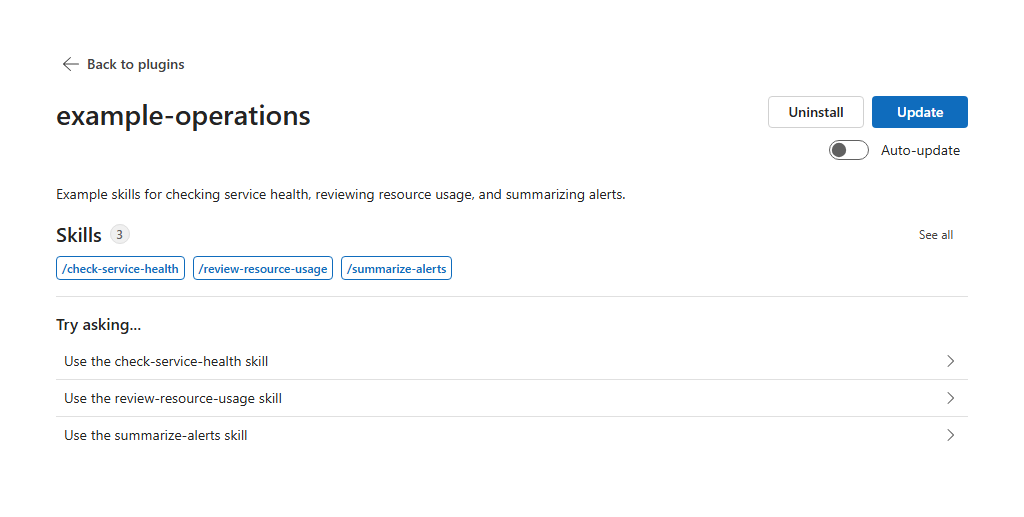
Install GitHub plugin. You can install a plugin from a GitHub repository URL without a marketplace. It gets the same version pinning and shared credential boundary. Azure DevOps plugins must come from a registered marketplace.
MCP connectors are set up separately from install. Installing a plugin records its MCP server requirements but does not provision the connector. The plugin's detail page surfaces a non-blocking Connector setup required banner when a required server has no matching connector yet; the Builder > Connectors page also tallies plugins needing setup so an admin can configure them in one place. Matching is loose: a connector is associated with a plugin by URL/command (or, for legacy entries, by name), so renaming a connector still keeps the link as long as the endpoint stays the same.
Authoring a marketplace
To create your own marketplace, structure your repository with a manifest file in one of these locations:
| File path |
|---|
marketplace.json (root) |
.plugin/marketplace.json |
.github/plugin/marketplace.json |
.claude-plugin/marketplace.json |
For single-plugin repositories, a plugin.json file works in the same locations (.plugin/plugin.json, plugin.json at root, .github/plugin/plugin.json, or .claude-plugin/plugin.json).
Skill files included at runtime
The skills field in plugin.json identifies one or more directories that contain skills. Each immediate child directory with a SKILL.md file is treated as a skill.
When the plugin is installed, the agent preserves the complete contents of each discovered skill directory recursively. This includes Markdown, JSON, YAML, KQL, Python, shell scripts, and other regular files, plus nested directories. Symbolic links and nested .git directories are not included. Supporting files are not loaded automatically; reference them from SKILL.md and read or execute them with an appropriate tool when needed.
Files outside a discovered skill directory are not copied into that skill's runtime directory. For example, with "skills": "./skills", a top-level dev/ directory is not available through the installed skill. Move required files under the applicable skill directory, or have the skill retrieve them through a supported tool at runtime.
There is no file-extension allowlist for files preserved in a skill directory. During discovery and metadata extraction, the agent inspects up to 256 files per skill directory, reads at most 256 KiB from an individual file, and loads at most 2 MiB of supporting-file content in aggregate. These inspection limits do not change the recursive runtime copy, but keeping supporting files text-based and focused makes them easier for the agent to use.
MCP server configurations
If your plugin integrates with an external tool server (like Datadog, Dynatrace, or Elasticsearch), include an .mcp.json file describing the server. The agent records these requirements at install time and surfaces them on the plugin's detail page so you can set up the matching connectors. Plugins that only contain skills do not need this file.
.mcp.json is resolved from the same conventional locations as the manifest:
| File path |
|---|
.mcp.json (root) |
.plugin/.mcp.json |
.github/plugin/.mcp.json |
.claude-plugin/.mcp.json |
Two formats are supported:
Nested format (standard):
{
  "mcpServers": {
    "my-server": {
      "command": "node",
      "args": ["server.js"],
      "env": { "API_KEY": "your-key" }
    }
  }
}
Flat format:
{
  "my-server": {
    "command": "node",
    "args": ["server.js"],
    "env": { "API_KEY": "your-key" }
  }
}
MCP servers are classified as:
- Supported: has a command (stdio) or a URL with authentication headers
- Unsupported: anything else (no command and no URL+headers combination)
Get started
Related capabilities
| Capability | What it adds |
|---|---|
| GitHub Connector → | Authentication methods for GitHub repos (OAuth, PAT, GitHub Apps) |
| MCP Connectors → | How your agent connects to MCP tool servers |
| Skills → | Understanding what skills are and how the agent uses them |