What is SRE Agent?
SRE Agent is your AI teammate for operations. It connects to your Azure resources, observability tools, incident platforms, and source code repositories—then helps your team respond faster, investigate deeper, and automate reliably.
What makes it different: SRE Agent continuously builds expertise on your environment. It remembers every investigation, learns your team's patterns, and runs background analysis even when nobody is asking questions—so it gets smarter with every interaction.
What can you achieve?
SRE Agent delivers four key outcomes for your operations team:
Autonomous Incident Response
Lower MTTR with proactive monitoring and intelligent remediation. When incidents fire, your agent gathers context, identifies root cause, and suggests—or executes—mitigations.
Example: PagerDuty alert → Agent checks logs + metrics + recent deploys → Finds memory leak → Suggests rollback
Lightning-Fast Root Cause Analysis
Multi-signal correlation delivers actionable insights. Your agent queries logs, metrics, traces, and deployment history simultaneously—then synthesizes findings into clear recommendations.
Example: "Payment API is slow" → Agent finds DB dependency latency spiked → Traces to unindexed query in recent deploy
Extensible Automation with Built-in and MCP Connectors
Connect your toolchain and build self-healing workflows. Use built-in connectors for Teams, Outlook, and incident platforms (PagerDuty, ServiceNow). Connect additional services like Jira, Datadog, and your internal systems via the Model Context Protocol (MCP). Browse and install community-built skills from the Plugin Marketplace with a single click. Create scheduled tasks for routine operations.
Example: Daily health report → Agent checks all services → Posts summary to Teams → Creates tickets for issues
Knowledge That Never Leaves
Every investigation teaches your agent something new. It captures root causes, resolution steps, team preferences, and operational patterns—building institutional knowledge that persists across conversations and never walks out the door. New team members ramp faster, on-call quality stays consistent regardless of who's paged, and your team's collective expertise grows automatically.
Example: New engineer joins on-call → Agent already knows deployment patterns, past incidents, and team procedures — consistent quality from day one
Works across your stack
SRE Agent connects to Azure resources directly and integrates with your existing tools:
Azure resources: Any Azure resource accessible via Azure Resource Manager, Azure CLI, or REST APIs
Built-in capabilities: Azure Monitor, Log Analytics, Microsoft Teams, Outlook
Managed connectors: Jira, GitLab, Notion, ServiceNow, Datadog, Splunk, PagerDuty, and more — each with a guided setup wizard and standardized authentication
MCP integrations: Connect any service via Model Context Protocol—incident management, source control, observability tools, on-prem systems, and your internal APIs
Plugin Marketplace: Browse community skills and install with one click, or connect a private marketplace with your organization's approved plugins
Learn more: Connectors · Skills (MCP) · Plugin Marketplace
Enterprise governance
SRE Agent is built to run in production, not just in a sandbox. Enterprise security and platform teams can deploy it at scale with layered controls — defense in depth across network, identity, authorization, and organizational governance.
Network isolation: VNet integration routes agent workspace traffic through your virtual network. Your NSG rules apply, your private DNS resolves. Private endpoints, internal APIs, and locked-down resources are reachable — the same way any other resource in your VNet would be.
Identity and RBAC: The agent authenticates with managed identity and operates under Azure RBAC. For source code, GitHub Enterprise support lets the agent authenticate as a governed service identity through a Bring Your Own GitHub App model — no personal accounts, no shared credentials.
Tool-level access control: Every tool the agent can use has an independent permission — allow, ask, or deny. Admins set global guardrails, team leads customize per subagent, users approve tools within their conversation. Deny always wins. Default is "ask." Deterministic rules, not AI suggestions.
Infrastructure as Code: Everything — the agent, its network configuration, its identity, its tool policies — is deployable via Bicep templates and Azure CLI through the same CI/CD pipelines you use for every other Azure resource.
Governed skill distribution: The Private Plugins Marketplace lets platform teams publish approved skills to a private GitHub repository. Every agent in the tenant installs from that governed catalog.
Learn more: Network controls · Tool governance · Permissions · VNet integration
How it works
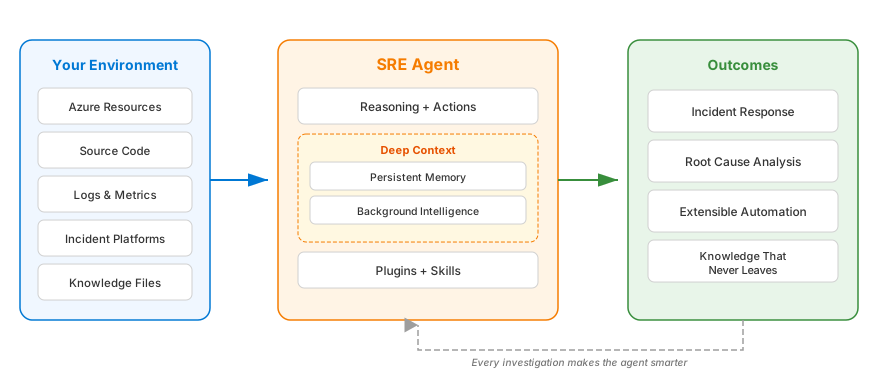
- Connect — Your Azure resources, communication connectors (Teams, Outlook), and any API via MCP
- Enhance — Add your runbooks, architecture docs, and domain-specific custom agents
- Achieve — Faster investigations, automated tasks, and reliable remediations
Your agent grows with your team
SRE Agent delivers value from day one and continuously improves:
- Day 1: Answers questions about your Azure resources, runs log queries, and analyzes metrics—useful immediately.
- Week 1: Learns your team's patterns—which metrics matter, which services are critical, how your team responds to issues.
- Month 1: Becomes an expert on your environment — recognizes recurring issues and applies what it learned from past investigations.
The longer you use SRE Agent, the more valuable it becomes.
Get started
Ready to see it in action? Create and set up your first agent.
New customers can evaluate SRE Agent with no always-on cost for up to 30 days. Consumption charges still apply.
Next steps
| Goal | Where to go |
|---|---|
| Evaluate SRE Agent | Review the 30-day trial |
| Create and set up your agent | Get started |
| Understand core concepts | Concepts |
| See what's possible | Incident Response |
| Learn how memory works | Memory and Knowledge |
| Follow step-by-step guides | Tutorials |