Memory & Knowledge
Your agent becomes more effective over time by remembering what worked in past incidents and referencing your documentation.
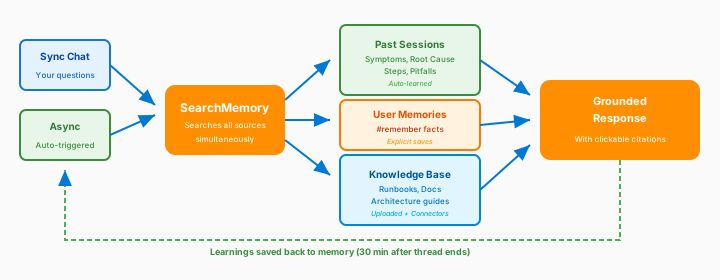
How Memory Works
When you ask a question, your agent searches across all knowledge sources simultaneously:
| Source | What it Finds | Best For |
|---|---|---|
| Past incidents | Steps that resolved similar issues | "How did we fix this before?" |
| User memories | Facts you've explicitly saved | "Remember my environment uses..." |
| Knowledge base | Your uploaded runbooks and docs | "Follow our standard procedure" |
The agent returns a grounded response with clickable citations showing exactly where information came from.
Automatic Learning
Your agent learns from every conversation—no manual training required.
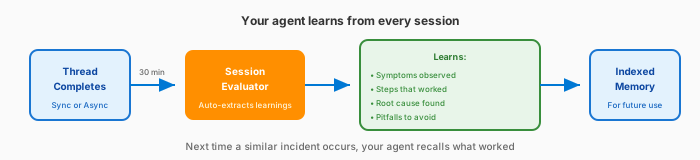
After each thread completes:
| What | Description |
|---|---|
| Symptoms observed | Error messages, behaviors, patterns |
| Steps that worked | The resolution path that succeeded |
| Root cause | What caused the issue |
| Pitfalls to avoid | What didn't work, dead ends |
This happens automatically. 30 minutes after a thread goes quiet, the agent evaluates the conversation and indexes the learnings.
Same-Resource Priority
When investigating a resource issue, the agent prioritizes past sessions on the exact same resource:
"App Service app-prod-01 is returning 503 errors"
Your agent first checks: "Have I seen issues on app-prod-01 before?" If yes, those learnings appear first—they have the highest relevance.
Proactive Knowledge Persistence
Beyond learning from completed threads, your agent actively saves what it discovers during conversations. When your agent encounters something important — a tricky configuration, a non-obvious dependency, or a debugging gotcha — it records the insight in persistent knowledge files that carry across sessions.
How it works
Your agent maintains a knowledge directory at memories/synthesizedKnowledge/. A special file, overview.md, is automatically loaded into your agent's system prompt at the start of every conversation. This gives your agent immediate access to the most important context about your environment.
| Component | What it does |
|---|---|
overview.md | Service summary and index — always loaded into context (~2,000 character budget) |
| Topic files | Detailed notes on specific subjects (e.g., aks-networking-gotchas.md) |
| Links from overview | overview.md links to topic files so your agent knows what detailed knowledge exists |
What your agent saves
Your agent proactively records insights during conversations:
| Category | Examples |
|---|---|
| Problem constraints | "This service can't scale past 10 replicas due to quota limits" |
| Strategies that worked | "Restarting the pod with --grace-period=0 resolved the stuck deployment" |
| Strategies that failed | "Increasing memory limit didn't help — the issue was CPU throttling" |
| Non-obvious dependencies | "app-frontend depends on a sidecar proxy that must start first" |
| Configuration details | "Production uses custom TLS certificates stored in Key Vault" |
Knowledge organization
Your agent organizes knowledge semantically by topic, not chronologically. Each file is a self-contained reference:
| File | What it captures |
|---|---|
overview.md | Service summary, key links, index of topic files (~2,000 chars) |
team.md | Team members, roles, expertise (~500 chars) |
architecture.md | Components, connections, environments (~1,500 chars) |
logs.md | Log sources, tables, key fields, useful queries (~1,500 chars) |
deployment.md | Pipeline details, version lookup, rollback procedures (~1,000 chars) |
auth.md | Auth mechanisms, identity flows (~800 chars) |
debugging.md | Common issues, troubleshooting guides, runbook links (~1,000 chars) |
queries/*.md | Extracted queries organized by topic (~1,000 chars each) |
When updating existing knowledge, your agent reads the current file, merges new information, and removes anything that has become outdated or incorrect.
Beyond automatic persistence, you can explicitly ask your agent to save information to its knowledge files:
Save this to your knowledge: our Redis cache uses Premium tier with 6GB,
and failover takes about 90 seconds.
Your agent creates or updates the appropriate knowledge file and links it from overview.md.
This is different from #remember commands (described below), which save discrete facts to a separate memory store. Knowledge files are structured, persistent references that your agent consults at the start of every conversation. User memories are individual facts searchable via #retrieve.
User Memories
Beyond what your agent learns and persists automatically, you can explicitly save discrete facts for your agent to remember. User memories are ideal for environment-specific details that might not come up in incidents but are important for context.
What to save as user memories:
| Category | Examples |
|---|---|
| Environment facts | "Production uses 3 AKS clusters in West US 2" |
| Team preferences | "We prefer CLI over portal for deployments" |
| Architecture details | "app-service-01 depends on sql-prod" |
| Escalation paths | "PagerDuty → Teams channel → phone" |
Memory Commands
Manage user memories with these chat commands:
| Command | What it Does | Example |
|---|---|---|
#remember | Save a fact for future reference | #remember our Redis cache uses Premium tier |
#retrieve | Search your saved memories | #retrieve what's our caching setup? |
#forget | Remove a saved memory | #forget the outdated Redis info |
Example memory workflow
Save important context:
#remember Production uses 3 AKS clusters in West US 2
#remember Our escalation path: PagerDuty → Teams channel → phone
#remember Database failover takes approximately 15 minutes
Retrieve later:
#retrieve how long does database failover take?
Based on saved memory: Database failover takes approximately 15 minutes.
Knowledge Base
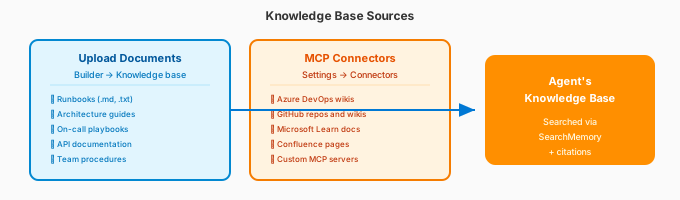
Upload Documents
Go to Builder → Knowledge base to upload your documentation. For full details on supported formats, limits, and how your agent creates knowledge automatically, see Upload Knowledge Documents.
| Document Type | Good For |
|---|---|
| Runbooks | Step-by-step incident procedures |
| Architecture guides | Understanding your environment |
| On-call playbooks | Escalation and response procedures |
| API documentation | Service-specific knowledge |
| Team procedures | Workflow and process docs |
Supported formats: Markdown, plain text, PDF, Word, PowerPoint, Excel, images, and more — max 16 MB per file. See Upload Knowledge Documents for the full list.
Connect External Sources
Access knowledge directly from external systems via connectors. See Connect Knowledge for the full list of supported sources.
| Connector | What it Provides |
|---|---|
| Azure DevOps | Query your ADO wiki pages |
| GitHub | Search repos, wikis, issues |
| Custom MCP | Any knowledge source you configure |
Configure connectors in Builder → Connectors. See Connectors for setup.
Using Knowledge in Conversations
Your agent automatically searches knowledge when relevant:
How should I handle a database failover?
If you have a runbook uploaded:
Based on your Database Runbook (citation link), here are the failover steps:
- Verify the health of the secondary replica...
Click citations to view the full source document.
Session Insights
After every thread—whether a sync chat conversation or an async auto-triggered task—your agent generates a session insight. This is how your agent gets smarter over time.
What gets captured
Each session insight extracts structured learnings that become searchable memory:
| Component | What it Captures | Example |
|---|---|---|
| Symptoms observed | Error patterns, behaviors | "HTTP 503 errors, memory at 95%" |
| Resolution steps | What worked | "Scaled up App Service SKU" |
| Root cause | Why it happened | "Memory leak in deployment v2.3" |
| Pitfalls to avoid | What didn't work | "Restarting didn't help" |
When insights are generated
| Thread Type | When | Auto or Manual |
|---|---|---|
| Sync chat | 30 min after last message | Automatic |
| Async tasks | 30 min after completion | Automatic |
| User feedback | When you rate a response | You trigger it |
Viewing session insights
Go to Monitor → Session insights to see:
- Timeline of agent actions
- Evaluation scores
- Key learnings extracted
- Source thread links — each insight card links back to the thread(s) that generated it, so you can trace any insight to its original conversation
See Monitor Agent Usage for detailed metrics and management.
Best Practices
What to Upload vs Connect
| Upload | Connect via Connector |
|---|---|
| Incident runbooks | Live wiki pages (ADO, GitHub) |
| Architecture diagrams | Source code repositories |
| Escalation procedures | Real-time monitoring data |
| Static API docs | Frequently updated docs |
Keep Knowledge Current
Outdated documents cause incorrect responses. Review quarterly.
What knowledge documents do you have?
Remove outdated docs in Builder → Knowledge base.
Name Documents Clearly
| Don't | Do |
|---|---|
| doc1.txt | production-database-failover.md |
| runbook.md | aks-cluster-scaling-runbook.md |
| notes.txt | escalation-procedures-2026.txt |
Related
| Resource | Why it matters |
|---|---|
| Connect Knowledge → | Manage all knowledge sources — files, web pages, and repositories — in one place |
| Upload Knowledge Documents → | Detailed file format support, limits, and agent-generated knowledge |
| Connect external knowledge sources → | How connectors bring external data to your agent |
| Understand custom agents → | How custom agents use knowledge in workflows |