Connect Knowledge
- Builder → Knowledge Sources is the central place to manage all knowledge sources — files, web pages, and repositories
- Upload runbooks and docs, add web pages by URL, or connect source code repositories
- Your agent references indexed knowledge automatically during investigations
- The more relevant knowledge your agent has, the faster and more accurate its responses
Why knowledge matters
Your agent is powerful out of the box with Azure observability and connected tools. But every team has unique context — runbooks, architecture docs, internal wikis, and code repositories that contain the tribal knowledge needed to resolve incidents quickly.
When your agent has access to this knowledge, it can:
- Reference your team's runbooks during incidents instead of starting from scratch
- Correlate production issues to specific code changes in your repositories
- Apply troubleshooting steps your team has already documented
Knowledge Sources — one place for all sources
The Knowledge Sources page in the portal (Builder → Knowledge Sources) is where you manage your agent's knowledge. You can upload files, add web pages, and view connected repositories.
Three types of knowledge sources:
| Source type | What it provides | How to add |
|---|---|---|
| Files | Runbooks, troubleshooting guides, architecture docs, configuration references | Upload via portal, drag-and-drop, or let your agent create them during conversations |
| Web pages | External documentation, status pages, internal wiki URLs | Add by URL — your agent indexes the content |
| Repositories | Source code for root cause analysis, deployment configs, infrastructure-as-code | Connect GitHub or Azure DevOps repos |
Each entry shows its name, indexing status (Indexed, Pending, or Not indexed), type, and last modified date. Hover over the ✓ Indexed status to see a Created at tooltip showing exactly when that source was indexed.
Verify data freshness
When a knowledge source has been indexed, hover over the ✓ Indexed status to see the Created at tooltip with the exact date and time it was processed. This helps you confirm your agent is working with the most current version of each document — especially useful after updating a runbook or troubleshooting guide.
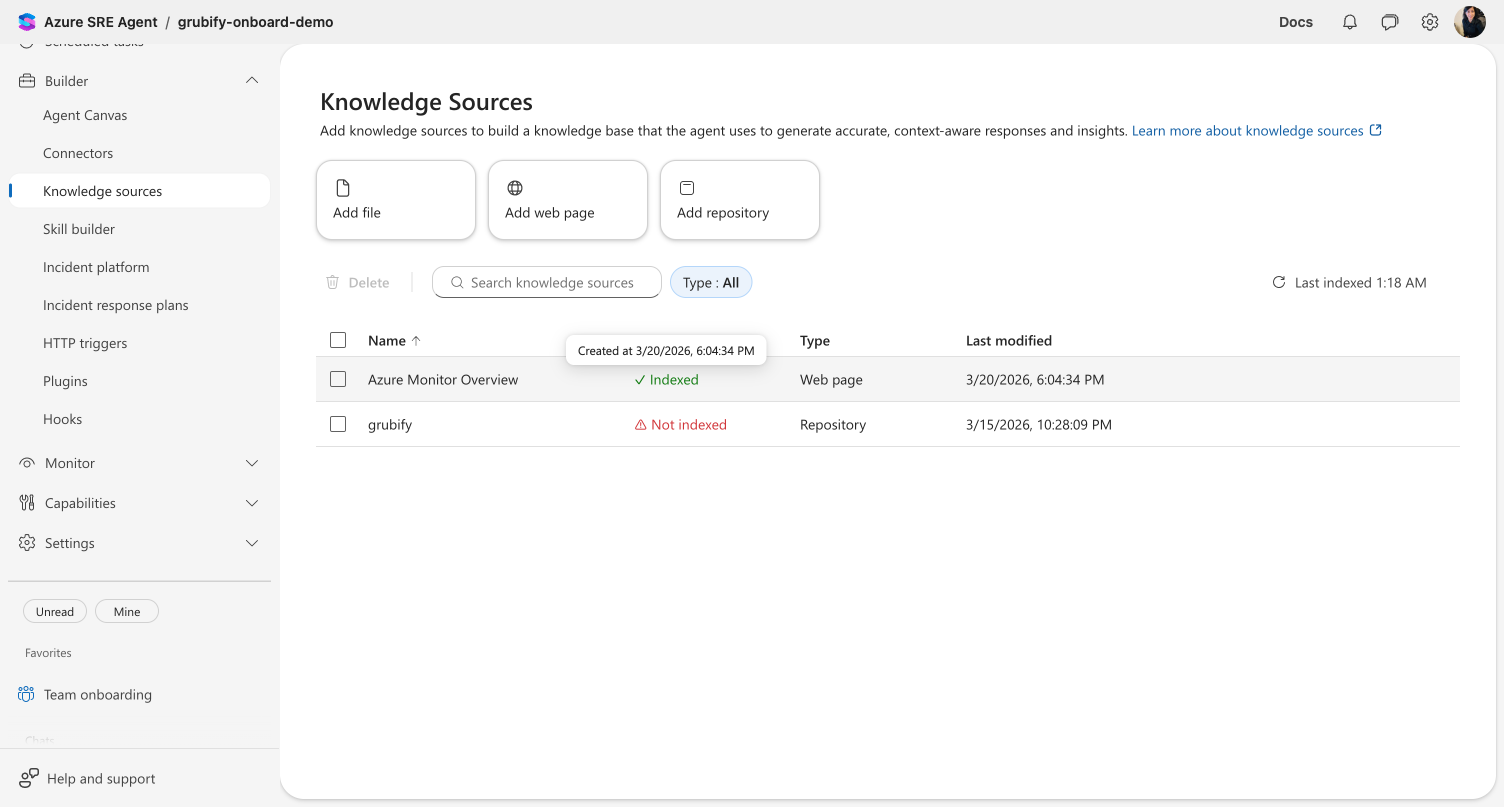
Knowledge sources display one of three statuses:
| Status | Meaning |
|---|---|
| ✓ Indexed | Content has been processed and is searchable. Hover to see the Created at timestamp. |
| Pending | Content is being processed — check back shortly. |
| ⚠ Not indexed | Processing failed. Try re-uploading or check the source URL. |
Upload documents
Your agent can create and upload knowledge during conversations — ask it to save a runbook from what you just resolved, and it stores the document automatically. You can also upload files directly through the portal.
For supported file formats and size limits, see Upload Knowledge Documents → Supported file formats.
→ Upload Knowledge Documents — full details on file types, limits, and agent-generated documents
Share files in chat
You can also attach files directly in chat — drag and drop, paste from clipboard, or use the + button. Chat attachments are stored with the thread and give your agent immediate context for analysis.
After attaching a file in chat, ask your agent: "Save this to Knowledge Sources." The agent reads the file from the thread and uploads a copy to Knowledge Sources — making it indexed and searchable across all future conversations. The original stays in the thread too.
| Upload Knowledge | Share Files in Chat | |
|---|---|---|
| Where | Builder → Knowledge Sources, or ask in chat | Chat message input (+, drag/drop, paste) |
| Storage | Agent-level — indexed, searchable across all threads | Thread-level — available in that conversation |
| Best for | Runbooks, architecture docs, procedures you want the agent to reference in every future conversation | Screenshots, logs, config files you need analyzed right now |
| Promote to knowledge | Already there | Ask the agent: "Save this to knowledge settings" — it copies the content to agent-level storage |
| Formats | 28 types — documents, data, images | 31 types — adds code, scripts, infrastructure, web |
| Size limits | 16 MB per file · 100 MB per upload | 10 MB per file · 50 MB total · 5 files |
→ Share Files in Chat — drag and drop, clipboard paste, and multimodal analysis
Connect source code
Connect GitHub or Azure DevOps repositories so your agent can search code, correlate errors with recent changes, and reference deployment configurations during investigations.
Add repositories
From Builder → Knowledge Sources, click Add repository to open a guided wizard that walks you through three steps:
| Step | What you do |
|---|---|
| 1. Choose a platform | Select GitHub or Azure DevOps. For Azure DevOps, enter your organization name. |
| 2. Authenticate | Sign in with OAuth or enter a personal access token (PAT). Azure DevOps also supports managed identity. |
| 3. Add repositories | Browse available repos from the dropdown or enter URLs manually. Add a display name and optional description for each entry. For Azure DevOps, select a project first to filter the repo list. |
You can add multiple repositories in a single session — click + to add rows, then click Save when done.
After saving, your repositories appear in the Knowledge Sources list with indexing status. Once indexed, your agent can reference the code in conversations.
Supported platforms and authentication
| Platform | Auth methods | What you need |
|---|---|---|
| GitHub | OAuth · Personal access token | GitHub account with repo access. For PAT, create a token with repo scope. |
| Azure DevOps | OAuth · Personal access token · Managed identity | Azure DevOps organization access. For managed identity, assign a user-assigned MI to the agent resource. |
→ GitHub Connector — full details on GitHub authentication and capabilities
→ Azure DevOps Connector — OAuth, Managed Identity, or PAT authentication, plus wiki knowledge indexing
Get started
| Resource | What you'll learn |
|---|---|
| Upload Knowledge Documents → | Add runbooks and docs to your agent's knowledge base |
| Connect to ADX → | Connect Azure Data Explorer for log queries |
| Connect GitHub → | Connect a source code repository |
Related capabilities
| Capability | What it adds |
|---|---|
| Upload Knowledge Documents → | Persistent file formats, limits, and agent-generated knowledge |
| Share Files in Chat → | Temporary file attachments for immediate analysis in a conversation |
| GitHub Connector → | Source code, issues, pull requests, and workflow access |
| Azure DevOps Connector → | Source code, work items, wiki knowledge, and pipeline access |
| MCP Connectors → | Extend to Datadog, Splunk, and other external systems |