Deep Investigation
- Structured 4-phase investigation: research → hypotheses → validation → conclusion
- Multiple hypotheses formed and validated in parallel — not just the first plausible answer
- Full transparency: interactive hypothesis tree shows validated, invalidated, and inconclusive paths
- Two trigger modes: on-demand from chat or automatic from incident response plans
The problem: first plausible answer isn't always the right one
Standard troubleshooting follows a predictable path: query logs, find an error, stop there. The first explanation that fits becomes the diagnosis — even when the real root cause is something deeper.
This works for routine issues. But for complex incidents — cascading failures, intermittent performance degradation, multi-service interactions — the first plausible answer often misses the actual cause. Teams spend hours cycling between "we think it's X" and "wait, it might be Y," manually correlating signals across monitoring tools, logs, and deployment histories.
The debugging methodology your senior engineers use — form multiple theories, test each one against evidence, rule out false leads — is exactly what's needed. But it's slow, manual, and locked in their heads.
How deep investigation works
Deep investigation applies structured reasoning to complex problems. Instead of stopping at the first plausible explanation, your agent systematically explores multiple possibilities and shows you exactly what it found.
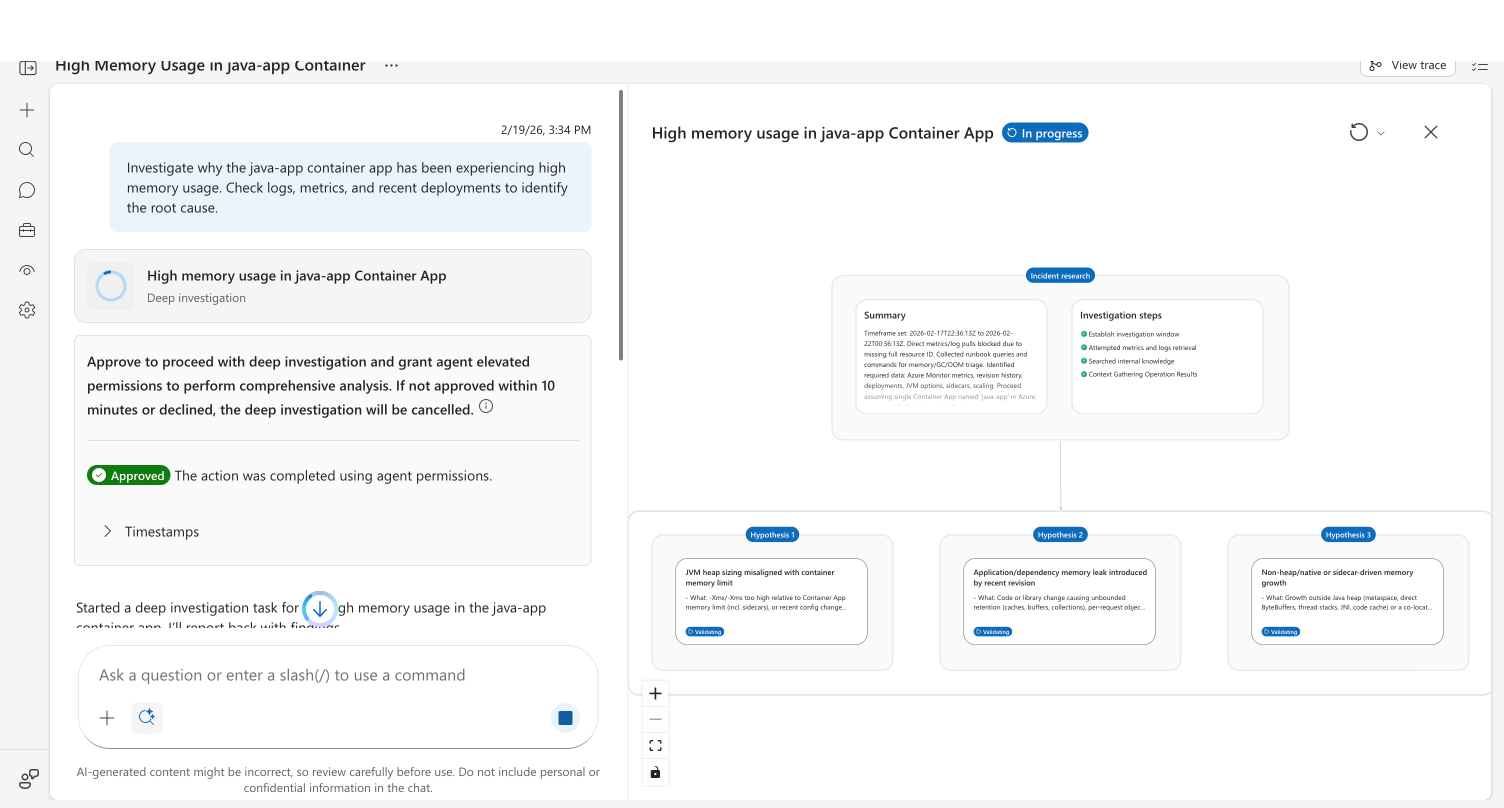
The investigation follows four phases:
| Phase | What happens | What you see |
|---|---|---|
| Incident research | Agent selects investigation tools, gathers context from logs, metrics, and connected data sources | Summary card with investigation steps |
| Forming hypotheses | Agent generates 2–4 theories about potential root causes based on gathered evidence | Hypothesis cards appear in the tree |
| Validating hypotheses | Each hypothesis is tested in parallel — validated ones spawn sub-hypotheses for deeper analysis | Status pills update: Validated, Invalidated, or Inconclusive |
| Conclusion | Agent synthesizes findings into a structured conclusion with evidence citations | Conclusion node with recommended actions |
Parallel validation
Your agent validates multiple hypotheses simultaneously — up to three at a time. This means a deep investigation that explores four theories doesn't take four times as long. Validated hypotheses at shallow depths generate child hypotheses (up to three levels deep), creating a branching tree of investigation paths.
Interactive hypothesis tree
Every deep investigation produces a visual hypothesis tree. You can click any node to see the full details — evidence gathered, validation steps taken, and reasoning behind each conclusion.
| Node status | What it means |
|---|---|
| Validated (green) | Evidence supports this hypothesis — may generate sub-hypotheses |
| Invalidated (red) | Evidence rules out this hypothesis |
| Inconclusive (yellow) | Available evidence neither confirms nor rules out this hypothesis |
| Validating (blue) | Currently being tested |
Two ways to trigger deep investigation
From chat (on-demand)
Use deep investigation when you want structured analysis of any complex question — not just incidents.
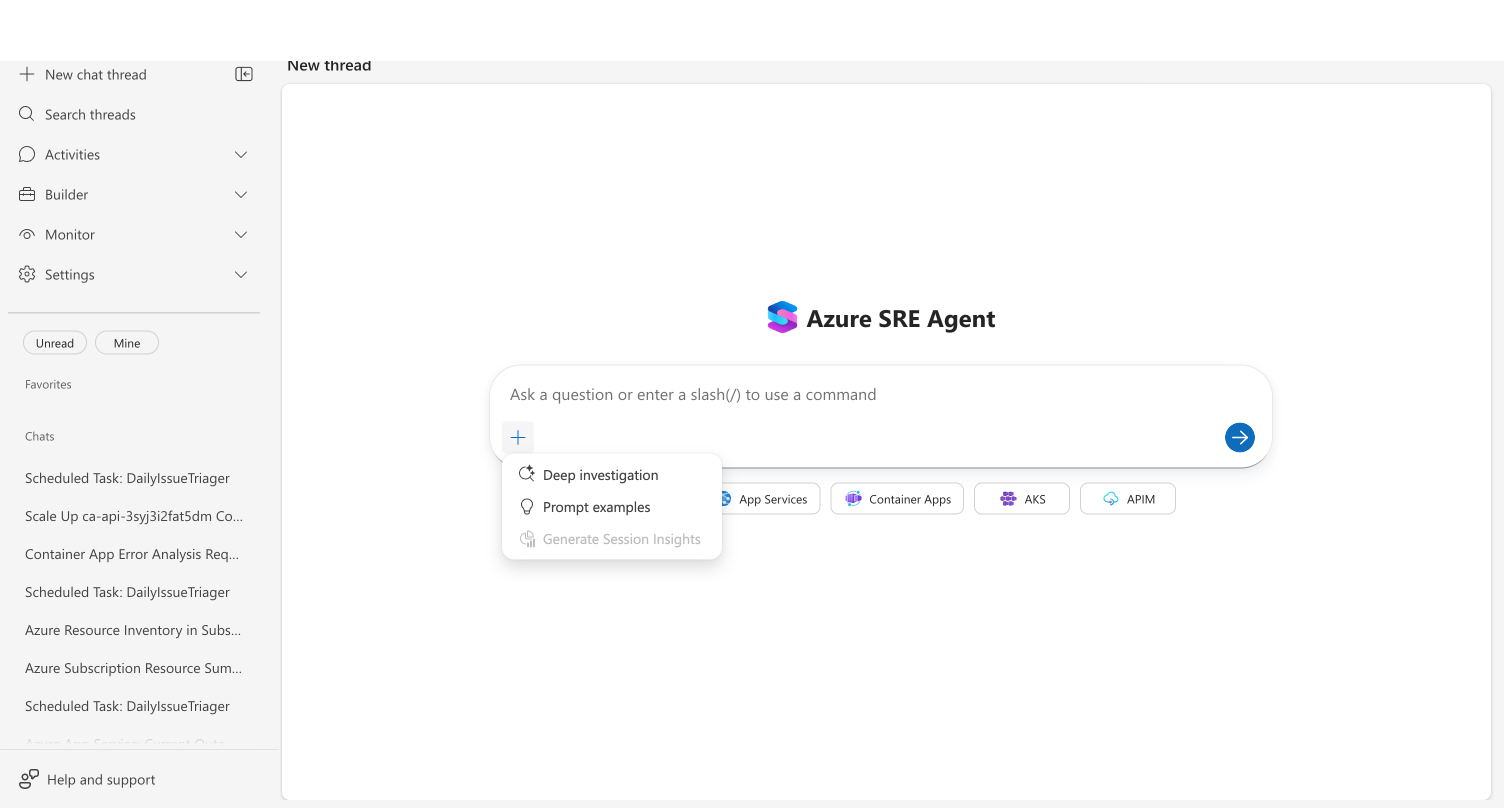
- Click the + button in the chat footer
- Select Deep investigation from the menu
- Type your question and send
For chat-triggered investigations, your agent requests authorization before proceeding. This grants your agent elevated permissions (using your identity) to query all relevant Azure resources.
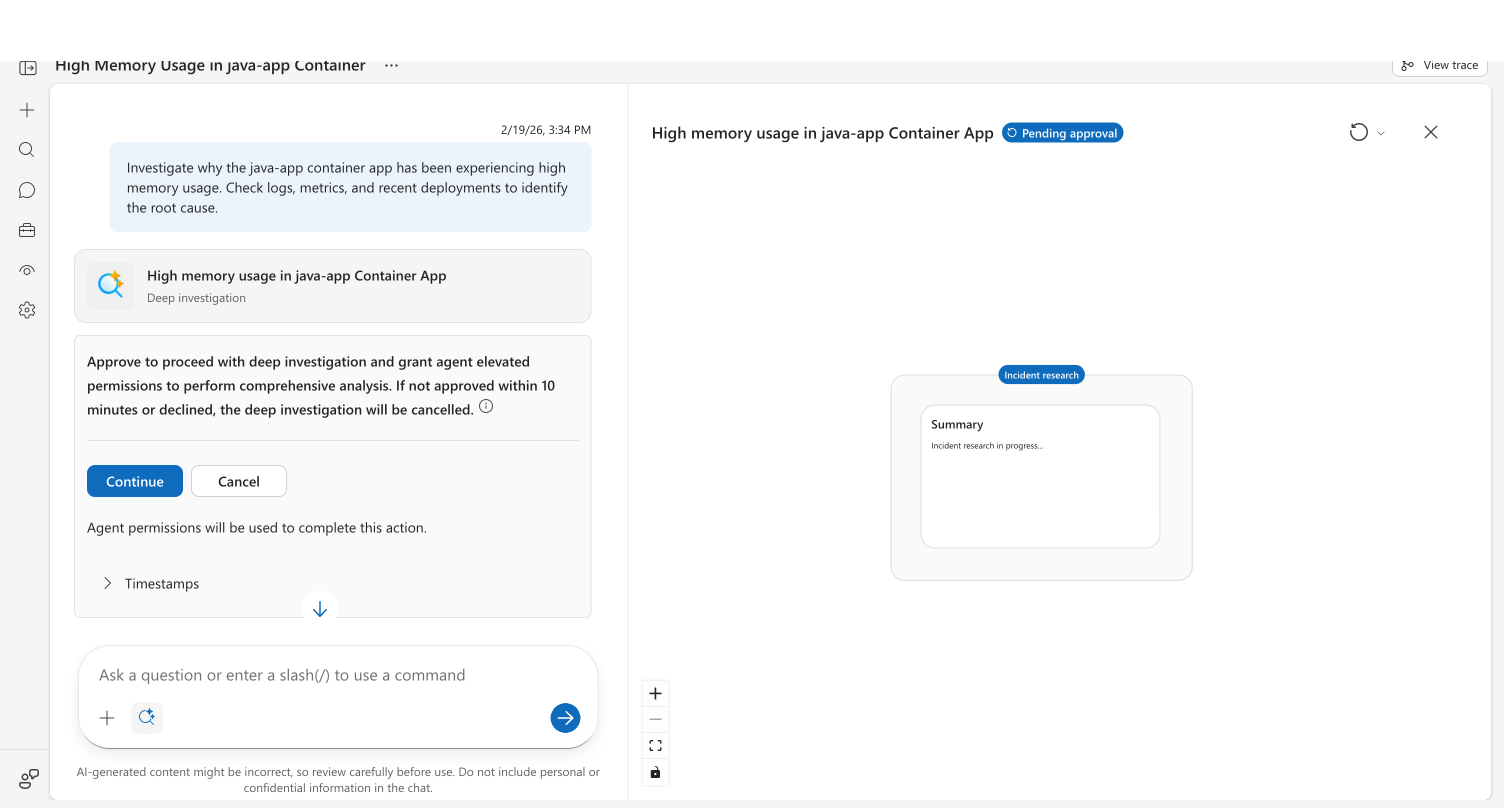
Click Yes to approve, or No to fall back to a standard investigation. If you don't respond within 10 minutes, the investigation is cancelled automatically.
From incident response plans (automatic)
Configure deep investigation to trigger automatically for specific incident types. In your response plan, enable the Deep investigation toggle:
api_version: azuresre.ai/v2
kind: IncidentFilter
metadata:
  name: production-critical
spec:
  incidentPlatform: PagerDuty
  priorities:
    - P1
    - P2
  agentMode: Autonomous
  deepInvestigationEnabled: true
When an incident matches the response plan, your agent starts a deep investigation immediately — no approval required. The investigation runs using the agent's managed identity permissions.
| Trigger mode | Authorization required | Permissions used | Best for |
|---|---|---|---|
| Chat | Yes (10-min timeout) | Your identity (delegated access) | Ad-hoc analysis, complex debugging questions |
| Response plan | No | Agent managed identity | Automated incident response, after-hours investigation |
What makes this different
Unlike standard investigation, deep investigation doesn't stop at the first plausible answer. It generates multiple hypotheses and systematically validates or invalidates each one. You see what was ruled out, not just what was confirmed.
Unlike manual war rooms, the entire reasoning process is visible in the hypothesis tree. Every theory tested, every evidence path explored, every conclusion reached — documented and reviewable. No more "we think it was X but we're not sure."
Unlike sequential debugging, hypotheses are validated in parallel. Three theories investigated simultaneously means faster time to root cause, even for complex multi-factor issues.
| Standard investigation | Deep investigation | |
|---|---|---|
| Approach | Linear: find evidence → explain | Structured: hypothesize → validate → conclude |
| Hypotheses | Implicit — agent follows one trail | Explicit — 2–4 theories tested in parallel |
| Transparency | Conversational response | Interactive hypothesis tree with evidence chain |
| Depth | Surface-level analysis | Up to 3 levels of sub-hypotheses |
| Duration | Seconds to minutes | Several minutes (thorough analysis) |
| Best for | Quick questions, known issues | Complex incidents, multi-factor problems, unknown root causes |
Cancel a deep investigation
Deep investigations can run for several minutes. If the investigation is no longer needed, you can cancel it:
During streaming — Click the Stop button (blue square) in the chat footer. The investigation card status changes to Cancelled, and any partial findings remain viewable.
During authorization — Click No on the authorization prompt. Your agent falls back to a standard investigation instead.
Approval timeout — If you don't respond to the authorization prompt within 10 minutes, the investigation cancels automatically.
Cancelling does not discard work already completed. Any hypotheses formed, evidence gathered, or phases completed before cancellation remain visible. Click the investigation card to view partial findings.
Before and after
| Before | After | |
|---|---|---|
| Debugging approach | Follow first plausible lead, hope it's right | Test multiple theories with evidence |
| Transparency | "We think it's the database" | "Hypothesis 1 validated: DTU at 98%. Hypothesis 2 invalidated: no recent deployments" |
| Evidence trail | In your head, lost after the call | Interactive tree with every path documented |
| False leads | Invisible — time wasted without record | Explicitly marked as invalidated |
| Complex incidents | Hours of manual correlation | Parallel investigation across data sources |
Example: High memory usage investigation
A Container App starts consuming excessive memory. You enable deep investigation and ask: "Investigate why the java-app container app has high memory usage."
Your agent runs the initial research phase — selecting 7 investigation tools, querying Azure Monitor metrics, checking deployment history, and searching your knowledge base. From this context, it generates three hypotheses:
- JVM heap sizing misaligned with container memory limit — heap settings (-Xmx/-Xms) too high relative to container limits
- Application memory leak introduced by recent revision — code change causing unbounded object retention
- Non-heap or sidecar-driven memory growth — metaspace, thread stacks, or co-located sidecars consuming memory
All three are validated in parallel. Hypothesis 1 is validated (JVM heap set to 4GB against a 4.5GB container limit, leaving insufficient headroom). Hypothesis 2 is invalidated (no deployments in the past week). Hypothesis 3 is inconclusive (sidecar metrics unavailable).
The conclusion: reduce JVM heap or increase the container memory limit. The full evidence chain — including what was ruled out — is preserved in the interactive hypothesis tree.
Get started
Deep investigation works out of the box — no additional setup required.
| Action | How |
|---|---|
| Try it now | Run a deep investigation from chat → |
| Automate it | Enable deepInvestigationEnabled: true in your response plan |
| Enhance it | Connect more data sources via connectors for richer hypothesis validation |
Related capabilities
| Capability | What it adds |
|---|---|
| Root Cause Analysis → | Foundational reasoning that powers hypothesis formation |
| Incident Response → | Automated response with deep investigation support |
| Azure Observability → | Built-in Azure data sources for investigation |
| 3P Observability → | External data sources via MCP connectors |
| Custom agents → | Create specialized agents that participate in investigations |